Google Said 'No Policy Violation'. Here Is What That Actually Means, and What to Do Next
2026-09-24
You reported a Google review, waited, and the answer came back: report reviewed, no policy violation. The review is still there, and it feels as if Google has sided with the reviewer. It has not, quite. That status means the first look found nothing to act on, and it is also the status that unlocks the appeal.
The three statuses, and what each one means
When you report a review from the Reviews Management Tool, you can follow it under Check the status of a review I reported and appeal options. Each report shows one of three statuses.
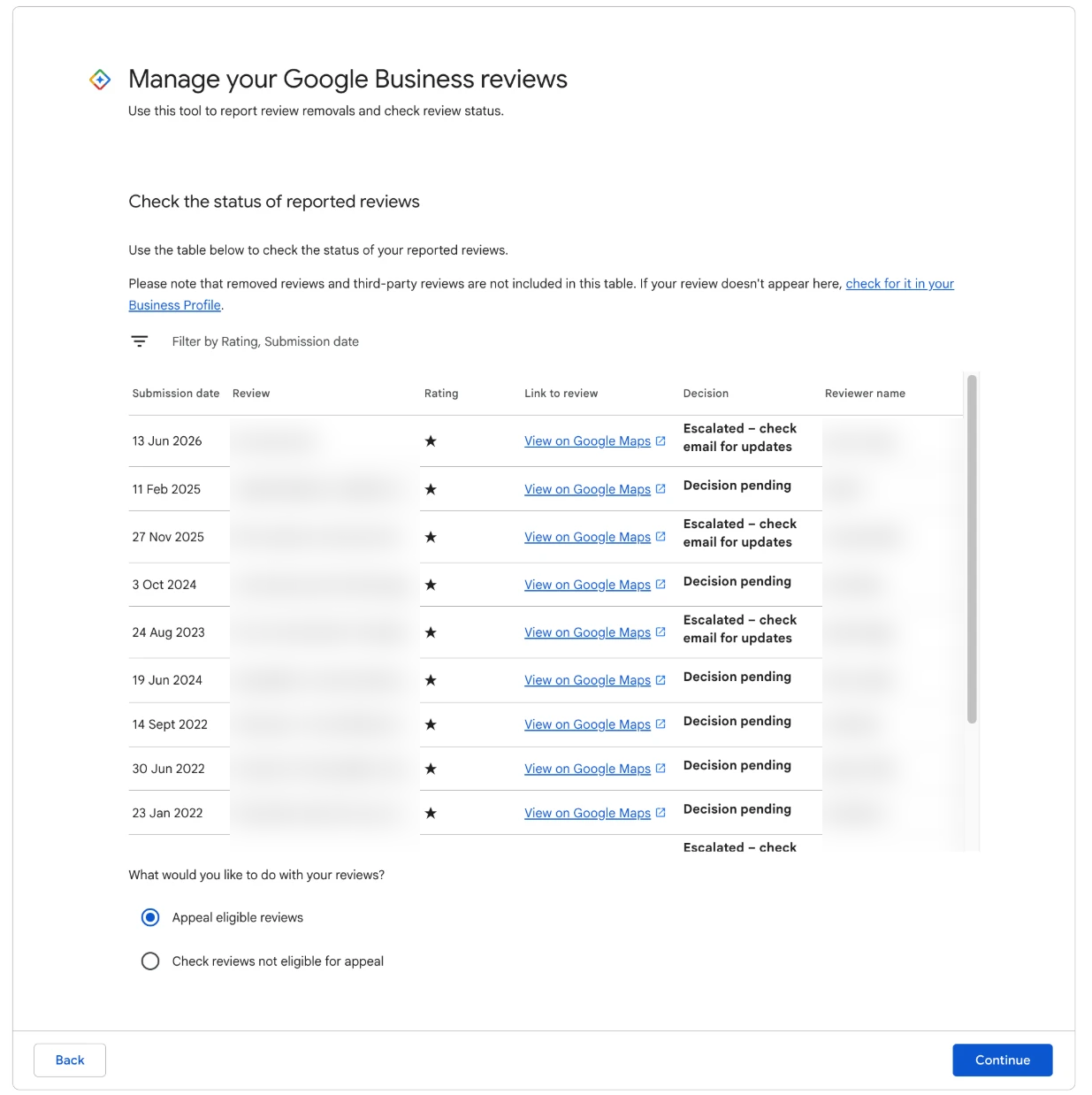
| Status | What it means | What to do |
|---|---|---|
| Decision pending | The report is in the queue and nobody has decided yet. | Leave it alone. Do not report the same review again. |
| Report reviewed, no policy violation | The first pass found nothing to remove. | Check whether the review is eligible for appeal. |
| Escalated | A person is looking at it more closely. | Wait. This can take weeks. |
There is no "removed" status. A review that is taken down simply disappears from your profile, and your reply goes with it. Decisions are also emailed to the account that made the report, so check the spam folder if you have not heard anything. The wider sequence is covered in what happens when you report a Google review.
Why most first reports come back this way
A declined first report does not mean the review is within the rules. In our experience it usually comes down to one of three things.
The wrong reason was chosen. A report has no text box. You pick one reason from a list, and that click is all the assessor has to go on. Pick "Spam" for a review that swears at your manager, and the report is judged against the wrong question. The lists also differ by screen: the Reviews Management Tool shows eight reasons, the business panel on Google Search shows seven, and the public listing and Maps app show six.
The report is really an argument about facts. Many owners report reviews because the story is untrue: the reviewer was never there, the price was different, the staff member was polite. Google removes rule-breaking words, not unfair reviews. A review from a real customer describing a real visit stays, however harsh or inaccurate you think it is, because there is no way for Google to settle who is telling the truth.
There is nothing quotable. A report succeeds when the review contains words that break a rule: a threat, a slur, a private phone number, a label like "criminals" stated as fact, swearing aimed at a person. If the whole review is a bad experience told badly, there is no phrase to point to, and nothing to remove.
The first reason is fixable. The second and third tell you something about the review itself. Our research found that about one in seven negative Google reviews breaks Google's own rules. That means plenty of declined reports were declined correctly, and a real number were not.
Your three next moves, in order
Work through these in order. Each depends on an honest answer to the one before.
1. Appeal, if the words break a rule
Read the review again, slowly, looking only at the words. Is there a specific phrase that a stranger would recognise as a breach without knowing anything about your business? A threat, an attack on a named employee's character or right to their job, a claim of fraud stated as fact, a reviewer admitting they never used you, profanity aimed at a person.
If yes, and the review is eligible, appeal. The appeal is the one place you write your case in your own words, name the policy and quote the exact phrase, and it is where most of our removals are won. How to appeal a Google review decision shows every screen.
2. Re-check the review for a different breach
If your first report was aimed at the wrong thing, look again with fresh eyes. Owners often report a review as fake when the stronger case is sitting in one sentence: a manager named and sworn at, a claim that you are "scammers", a line clearly about a different business. The breach you appeal on does not have to match the reason you clicked in the report.
Our guide to Google review policy violations shows what the common breaches look like in real reviews. The quick test we use to run a review against all 12 breaches Google acts on, in a couple of minutes, is in The Google Review Removal Playbook.
3. Switch to the reply
If the honest answer to both is no, the review is a real customer describing a real visit, and no appeal will change that. Your best move is a calm, short public reply that future customers will read: acknowledge the experience, give your side in a sentence or two without heat, and offer a direct way to reach you. Our reply templates for negative Google reviews cover the common cases.
A good reply often does more for you than a removal would. Customers who read a composed answer to a harsh review tend to trust the business more, not less.
Which reviews are eligible for appeal
When you open the status check, each declined review is listed as eligible or not eligible for appeal.
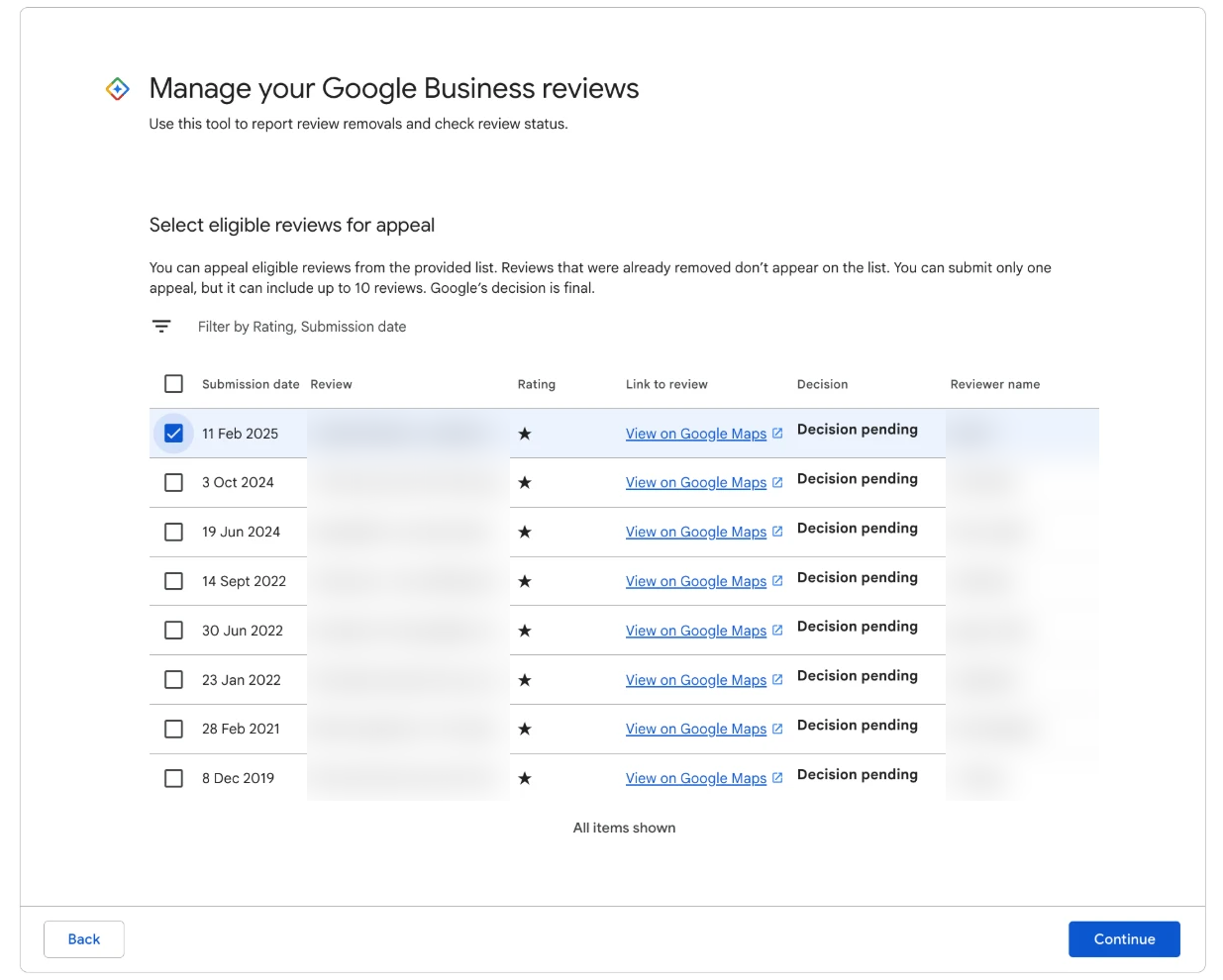
Only reviews marked eligible can be ticked and taken through to the appeal form.
A few things we have learned about this list:
- A review still marked Decision pending will not show as eligible. Wait for the decision.
- You can put up to 10 reviews in one appeal submission, each with its own argument.
- A review listed as not eligible is not necessarily closed for good. If it has been edited, if you have found a better-fitting reason, or if some time has passed, a fresh report gets a fresh look, and we have seen that make a review eligible for appeal again. It does not happen every time, so treat it as a bonus.
- If this screen shows "Error accessing the workflow. Please escalate the issue." instead of the list, that is a fault on Google's side, not a flag on your account. Here is how we get around it.
The appeal is once per review, so do not waste it
Each review gets one appeal, and that decision is final on this route. This is the single most important thing to understand before you open the form.
An appeal written in frustration ("this is fake, this person was never here, this is destroying our business") spends that one chance on an argument Google does not rule on. The same review, appealed calmly on the one sentence that breaks a rule, has a real case.
So before you submit:
- Pick one policy. The strongest one, not every one that might apply.
- Quote, do not describe. The reviewer's exact words are the evidence.
- Leave the story of the visit out. That goes in your reply.
- Batch only your strongest. A submission of 10 reviews should be 10 clear breaches, not three strong ones and seven hopeful ones.
What to write in a Google review appeal goes through both fields in detail.
When to stop
Stop pursuing removal when any of these is true:
- The appeal has been declined. That is final for the review on this route.
- You have read the review three times and cannot point to a phrase that breaks a rule, only to a story you disagree with.
- The review is harsh but describes a real visit. An unfair review is not the same as a removable one.
Stopping on removal does not mean stopping altogether. If the complaint has substance, fixing it with the customer is often the fastest way to see a review updated, as long as you never offer anything in exchange for changing it. If the review states something false and damaging as fact, the legal route for defamation runs separately from Google's content rules. And every new review from a real, happy customer makes the old one matter a little less.
Put a note in your calendar to check your declined reports once a month, because a review that gets edited next week can contain a clear breach that was not there when you first reported it.
Turn a declined report into a removal
The quick test tells you if a declined review is worth appealing, and the templates give you the exact appeal wording for each breach.
Get the Playbook · $99Several locations or a group? Talk to us about a managed service · Popular locations: Sydney · Melbourne · Brisbane · Perth · Adelaide · Gold Coast · all locations