How to Appeal a Google Review Decision (With the Real Screens)
2026-09-24
Your report on a Google review came back "no policy violation", the review is still on your profile, and you want to know whether that is the end of it. It is not. There is an appeal, it sits in a screen most owners never find, and it is where most of our removals are won.
Why the appeal is where cases are won
The first report is a multiple-choice question. You pick one reason from a short list, there is no text box, and the review is assessed against that single click. A review can plainly break a rule and still come back declined at this stage, because nothing in the report points at the words that break it.
The appeal is different. It is the one place in the whole process where you write your case in your own words, name the exact policy, and quote the part of the review that crosses the line. That changes what the reader has to work with.
So treat a declined report as a step, not a loss. For the reviews we handle, the declined report is usually what opens the door to the removal.
The precondition: a report that came back "no policy violation"
You cannot appeal a review you have not reported, and you cannot appeal while the report is still open. The sequence is fixed:
- You report the review, ideally from the Reviews Management Tool.
- The report is assessed. Most are decided within a few working days, though we have seen anything from a day to several weeks.
- The decision is emailed to the account that made the report (check the spam folder), and the status changes to Report reviewed, no policy violation.
- Only then can the review become eligible for appeal.
If the review simply disappears, the report worked and there is nothing to appeal. If you have not reported it yet, start with how to report a Google review as the business owner. If you are looking at the declined status now and wondering whether to appeal at all, what "no policy violation" actually means walks through that decision.
Where the appeal lives
The appeal is not on your Business Profile, not in Google Maps, and not on the review itself. It sits inside the Reviews Management Tool, the owner's tool at support.google.com/business/workflow/9945796 (searching "Google Reviews Management Tool" finds it too). Our guide to the Reviews Management Tool covers every screen.
Sign in with the Google account that owns or manages the profile. The tool asks you to confirm that email, then to pick the business. If you have several locations, each is listed on its own. You then land here:
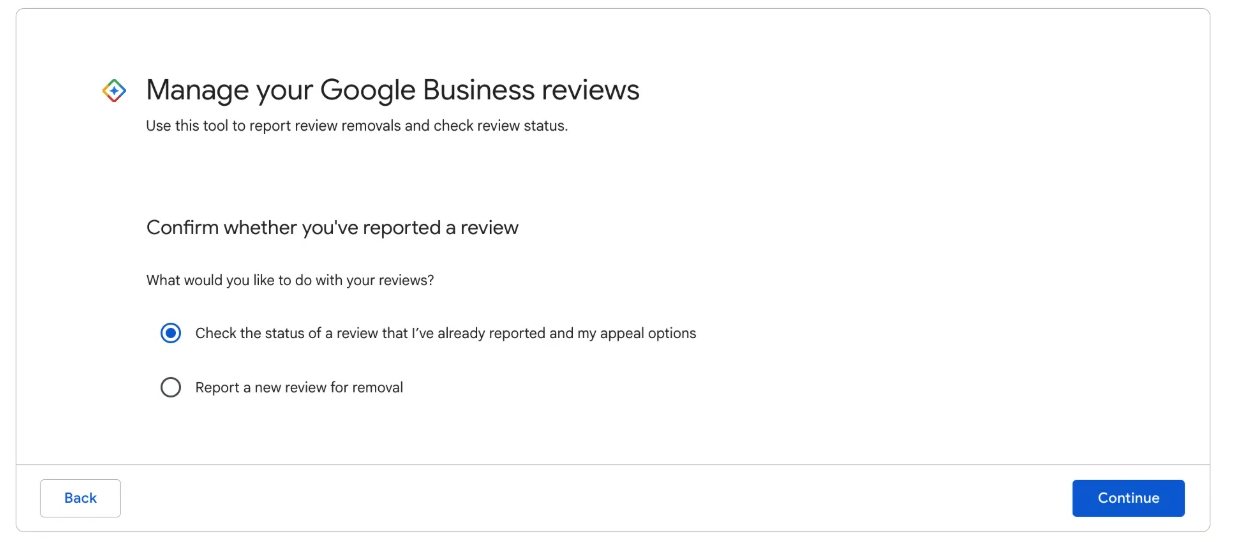
The second option, "Check the status of a review I reported and appeal options", is the way in.
Choose Check the status of a review I reported and appeal options. The tool lists the reviews you have reported, and marks each declined one as eligible or not eligible for appeal.
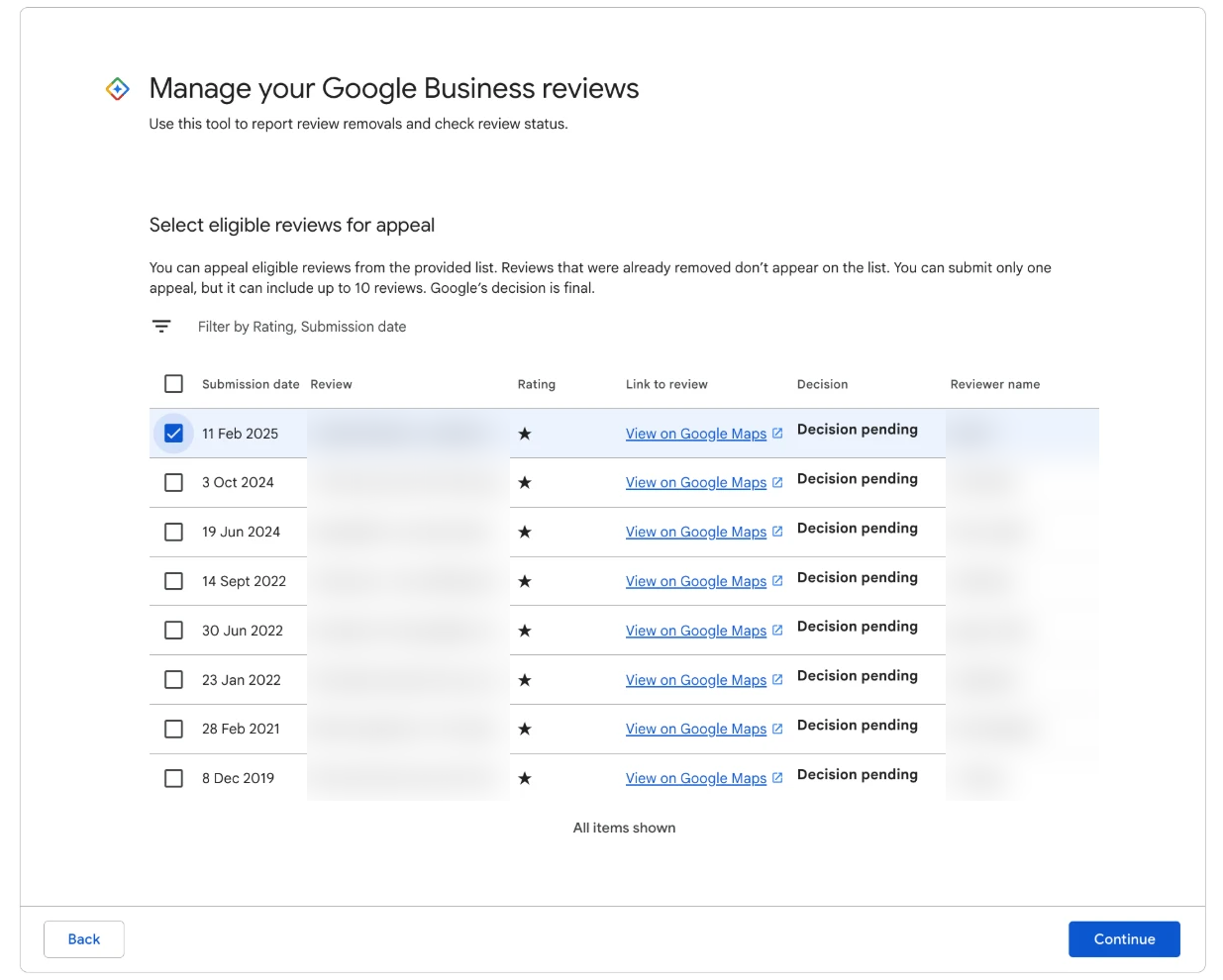
Tick the eligible reviews you want to appeal, then continue to the form.
You can include up to 10 reviews in one submission, and each gets its own argument. Only include the ones with a clear breach. A review marked not eligible cannot be appealed from here, although a fresh report sometimes brings it back onto the list.
If this step shows "Error accessing the workflow. Please escalate the issue." instead of the list, that is a fault on Google's side that has been common since July 2026. Our workaround guide covers what to try.
The two fields that matter
The form is short. Most of it is housekeeping: the business is already filled in, you tick the reviews, you can attach evidence, and you confirm that your information is accurate. Two fields decide the outcome.
The policy field. It asks which policy the review breaks. You type one policy, written the way Google writes it: Harassment, Misrepresentation, Personal information, Obscenity & profanity, Off-topic, Fake Engagement and so on. One per review. Never a clause number. Google does not publish numbered clauses, and a made-up one undermines everything after it.
The why field. It asks why you believe the review breaks that policy. This is your argument, and it needs to be checkable in seconds: the rule, the reviewer's exact words, the link between the two, and a plain request for removal. Whoever reads it is working through a long queue. If they can see the banned words and the rule side by side, the decision is easy.
The link is the part that wins or loses it, and it is the part owners find hardest to write. We use a short, fixed structure for it, and the finished wording for each of the 12 breaches we file against is in The Google Review Removal Playbook. What belongs in that field, and what gets appeals declined, is covered in more depth in what to write in a Google review appeal.
What a strong appeal leaves out
Most declined appeals we see fail on what they include rather than what they miss. A strong appeal leaves out:
- The story of the visit. "This never happened" or "they were only here for five minutes" turns a rule breach into a dispute about facts. Google does not referee disputes between businesses and customers, so a contested story gives it a reason to leave the review up.
- Your feelings about it. "This is hurting our business" and "we have hundreds of five-star reviews" are true and fair. They belong in your public reply, where customers read them. The appeal is only about the words and the rule.
- Threats. Mentioning lawyers, defamation or legal action does not move a policy decision, and it makes the appeal read as a grievance. If you believe a review is defamatory, that is a separate route with its own form.
- Everything about the customer. Their history with you, their character, what you suspect about them. The appeal is about what is written on the page, not about who wrote it.
- Descriptions in place of quotes. "The reviewer was abusive" is your opinion. Their exact words in quotation marks are evidence.
- Extra policies. One policy, well argued, beats three thrown at the wall.
Calm and short reads as credible. No capitals, no exclamation marks.
One review, start to finish
A mechanic gets a one-star review. Most of it is a complaint about how long a service took and the price of a part, which the reviewer is entitled to say. But the opening line calls the business "a pack of crooks who rip off pensioners".
The owner takes a screenshot before doing anything else, in case the review is edited later. They report it through the Reviews Management Tool the same morning, picking the closest reason on the list. That afternoon they post a calm public reply that deals with the wait and the price, offers a direct phone number, and says nothing about the report.
Eight days later the email arrives: report reviewed, no policy violation. The owner opens the tool, chooses the status check, and the review is listed as eligible for appeal.
In the policy field they type Misrepresentation. In the why field they set out the rule, quote the "crooks" line exactly, and explain in a few sentences that it presents a crime as a fact about the business rather than describing the service the customer received. They do not argue about how long the job took or whether the part was overpriced. They tick the confirmation box and submit. A case ID arrives by email, and the owner logs it with the date.
Then they leave the review alone. No second report, no edits to the reply, no messages to the reviewer. The complaint about the price is fair comment and would stay on its own. The label is what breaks the rule, and the appeal is built entirely on it. Reviews like this one are covered in more depth in removing a review that calls your business a scam.
What the decision looks like, and how long it takes
Appeal decisions come by email to the account that lodged the appeal, usually within days and sometimes after several weeks. You receive a case ID when the appeal is received, and it is worth keeping with the date you lodged it.
A successful appeal looks like this:
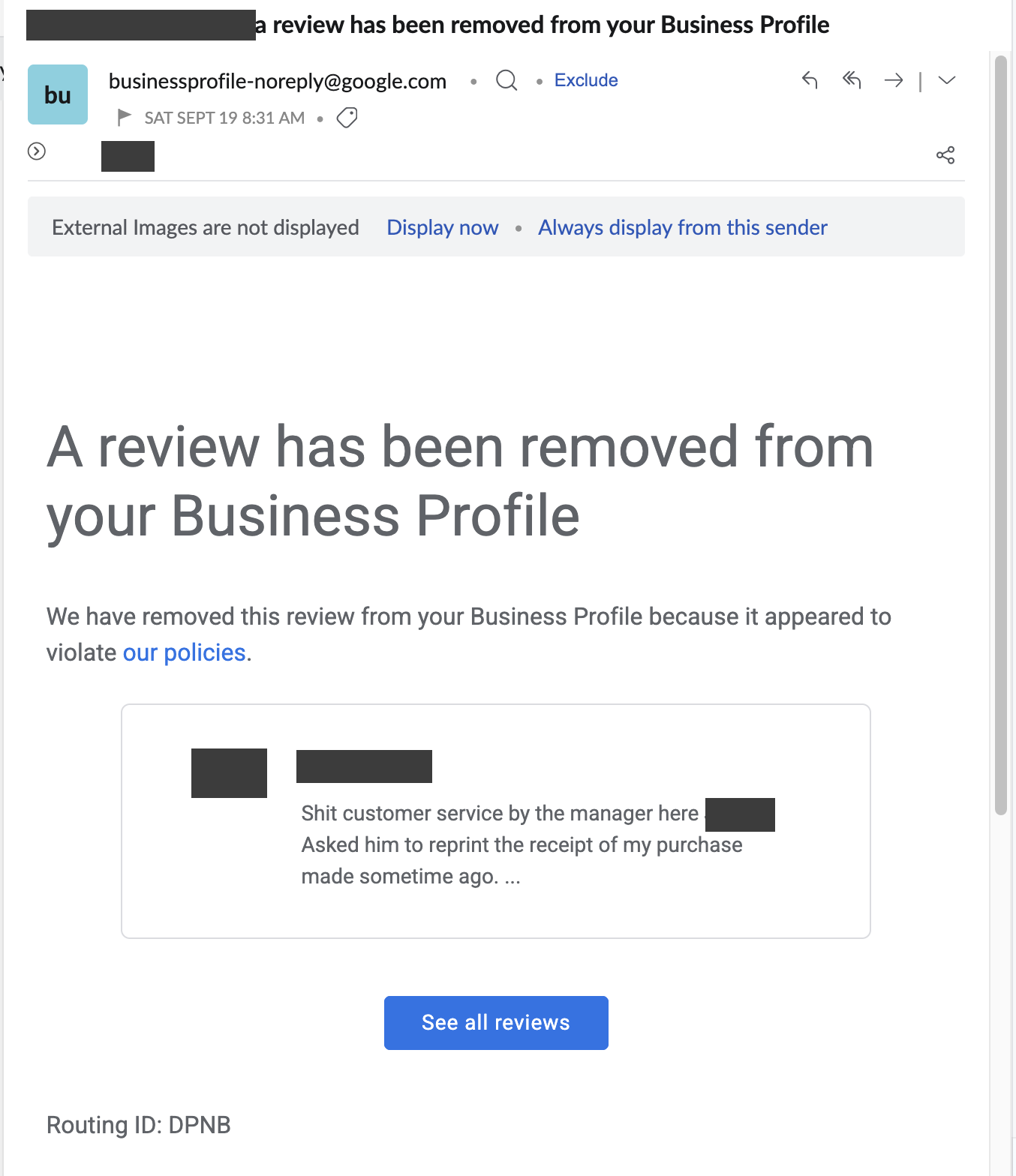
The subject line reads "A review has been removed from your Business Profile". This one followed our appeal on a review that swore at a named manager.
Your public reply disappears with the review. If the appeal is declined, that decision is final for that review on this route, which is why it pays to build it properly the first time. A declined appeal still leaves other options, from a resolved complaint that the reviewer chooses to update, to the legal route for defamation, and your reply keeps working either way. For the timing of every stage, see how long Google takes to remove a review.
While an appeal is open, the only jobs left are to keep the case ID safe and to check your spam folder every few days, because that is where decision emails most often land.
Get the appeal wording that wins
All 12 appeal templates with worked examples, plus the report screens and a tracker, so your one appeal on each review is built properly.
Get the Playbook · $99Several locations or a group? Talk to us about a managed service · Popular locations: Sydney · Melbourne · Brisbane · Perth · Adelaide · Gold Coast · all locations