A Google Review Called Your Business a Scam. Can It Be Removed?
2026-09-24
A one-star review has landed on your Google profile and the word "scam" is in it. Maybe it says "scammers", maybe "fraud", maybe "crooks". You have done nothing dishonest, the review sits near the top of your profile, and everyone who looks you up now reads that word before they reach a single good review.
Some of these reviews can be removed. Many cannot. The difference comes down to a few words, and once you can see it, you will know within a minute which kind you are dealing with.
What Google's rule actually covers
Google does not remove reviews for being unfair, exaggerated or one-sided. It removes reviews whose words break one of its content rules. A review from a real customer describing a real visit stays up, however harsh it is.
The rule that covers scam reviews is Misrepresentation. It catches a review that labels your business as criminal, stated flatly as a fact about what you are: scammers, fraudsters, thieves, con artists, crooks. That is an accusation of a crime presented as settled truth, with nothing behind it, and it misrepresents your business to everyone who reads it.
Two things surprise most owners:
- The reviewer does not have to be fake. Some of the reviews we get removed most readily are from real customers who had a real grievance and then crossed a line while writing about it.
- You do not have to prove the accusation is false. You are not asking Google to decide who was right. You are pointing at words on the page and showing they break a rule.
Our research found that about one in seven negative Google reviews breaks Google's own rules. A flat "scammers" label is one of the cleaner cases to put in front of Google, because the evidence is a single word the reviewer chose.
The label versus the account
This is the heart of it. Read the review looking for one thing: is the reviewer describing what happened to them, or telling the world what you are?
An account describes events. "They charged my card twice and took three weeks to refund it." However damaging, that is the reviewer's version of a transaction, and Google will not referee it.
A label is a verdict on your business, stated as fact. There is no event in it, only a claim that you are criminals.
Wording that qualifies (invented examples):
- "Do not hand these frauds a cent."
- "Crooks, the lot of them."
Wording that only looks similar:
- "The whole thing felt like a scam to me."
- "In my opinion that is a dishonest way to treat people."
The first pair states criminality as fact. The second pair reports a feeling or an opinion, marked as the reviewer's own, and that is allowed.
Read to the very end of long reviews. Reviewers angry enough to write out a detailed story very often finish with a label: three paragraphs about a delayed refund, then "absolute scammers, avoid". The story stays. The label is the case. When you file, you point at the label and leave the story alone.
Why "I felt ripped off" and "overpriced" stay
It is natural to read "rip-off" and "scam" as the same insult. They are treated very differently, and filing against the wrong one wastes your only appeal on that review.
- "I felt ripped off." A feeling about their own experience. Allowed.
- "Overpriced", "a rip-off", "a waste of money". Opinions about value. Allowed, always, however wrong you think they are.
- "It felt like a scam." The word is there, but it is framed as how they felt. Still a feeling.
- "Shady" or "dodgy". A dig at your honesty rather than a flat accusation of a crime. Worth a free report, not an appeal. The closer the wording gets to calling you criminals, the stronger it becomes.
Customers are entitled to think you charge too much and to say so. The rule protects you from being branded a criminal, not from being called expensive.
Before you report anything, write down the exact word or phrase you are relying on. If the only candidates are "ripped off" and "overpriced", this is not a removal case, and your time is better spent on the reply further down. If the review states something false and seriously damaging as fact, there is also a legal route, covered in our post on Google review defamation in Australia.
How to report it, and what goes in the appeal
Report from Google's Reviews Management Tool, signed in to the account that owns or manages your Business Profile. It is the only place you can check the status of a report and lodge an appeal later. Our guide to the Reviews Management Tool walks through each screen.
Take a screenshot of the review first. If the reviewer edits it later, you still have the original words.
Choose "Report a new review", click Report beside the review, and pick Spam. There is no reason called Misrepresentation on this screen and no text box, so the reason does all the work. Spam is the one that carries this breach.
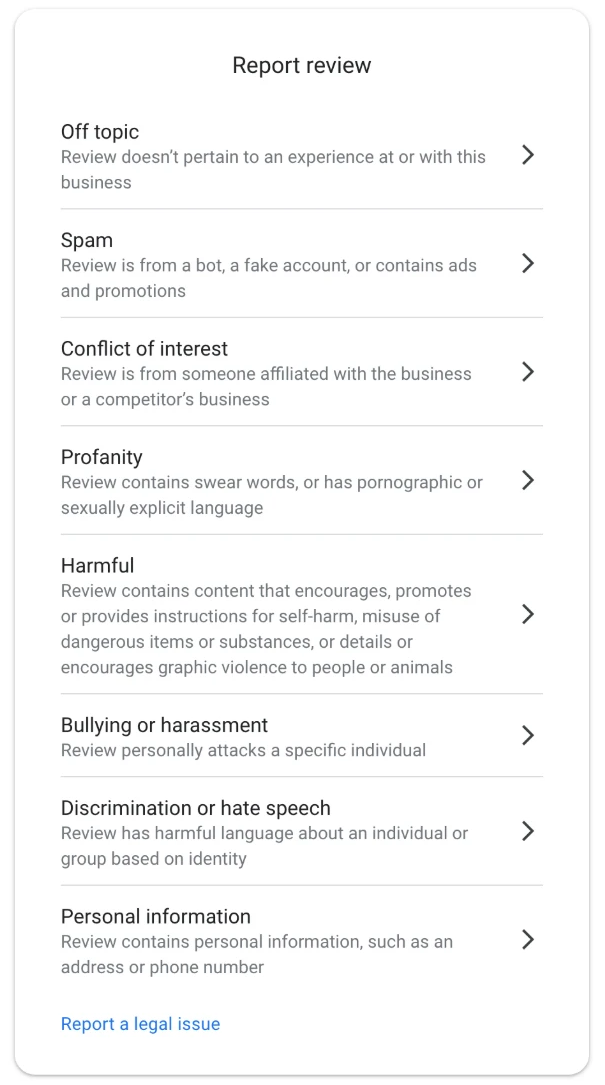
The eight reasons offered in the tool. For a scam label, pick Spam.
If you report from the public listing or the Google Maps app instead, Spam is not on the list. Low quality information is the closest match on that shorter list.
Many first reports come back "Report reviewed, no policy violation". That is not the end. It is the step that opens the appeal, and the appeal is where most of our cases are won. Here is what to do after a "no policy violation" decision.
The appeal form has two fields that matter. In the first, the policy, type Misrepresentation. In the second, you explain why the review breaks it. The approach that wins quotes the exact label in quotation marks, names the policy, connects the two, and says nothing about what happened in your shop. There is a short, fixed structure for that second field, and The Google Review Removal Playbook has the template for this breach ready to paste, with a worked example beside it.
You get one appeal per review and the decision is final, so build it properly the first time. If the appeal screen shows "Error accessing the workflow", that is a fault on Google's side, and this is how to get past it.
An appeal we won on a "scammers" review
A client of ours had a one-star review that opened with the words "Do not use these scammers". The rest of it described slow replies by text message. It came from a real customer who was frustrated with response times.
The first report was declined. Our appeal quoted the one word, pointed out that nothing in the review described any dishonesty, only delays in communication, and asked for removal under Misrepresentation. It did not dispute the delays, defend the business, or mention the owner's other reviews.
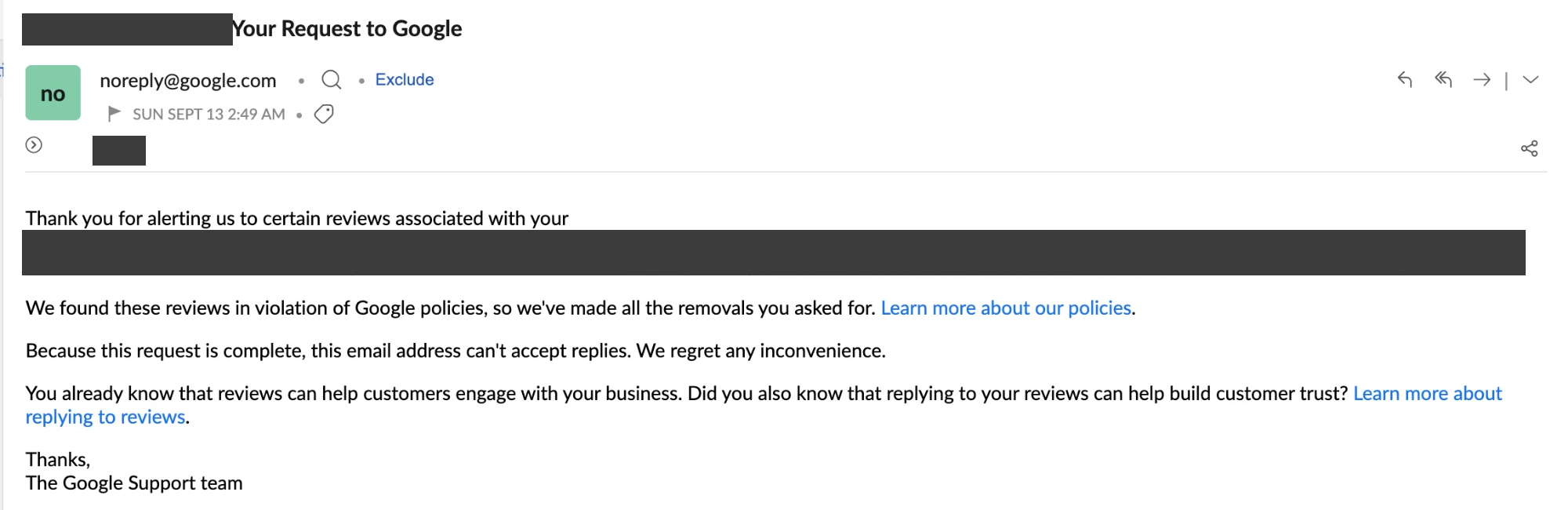
Google's reply to that appeal: every removal requested was made.
The lesson is what the appeal left out. The moment an appeal says "this never happened", it becomes a dispute about facts, and Google does not settle disputes. We cover the rest of that discipline in what to write in a Google review appeal.
If the review does not qualify, reply to it
Most scam reviews that are really accounts of a refund or billing dispute will stay up. Your reply is now the most important thing under that review, because it is the part you control and every future customer reads it.
A good reply here stays calm, states your normal practice in one plain sentence, and gives a direct way to reach you. It keeps the customer's private details private: no invoice amounts, no account history.
What it must never do is repeat the accusation. "We are not scammers" puts the word under your business name a second time, in your own voice. Describe how you work instead, along the lines of "Every job is quoted in writing before we start." The playbook has reply templates for a refund or policy dispute and for an account you dispute, and our negative Google review reply templates post explains what each one is for.
Post the reply the same day you report. If the review comes down, the reply goes with it. If it stays, the next customer reads your calm answer directly beneath the angry one.
Before you do anything else, reread the review and find the one word that calls you criminals. If it is there, report it as Spam today. If it is not, write the reply first.
Called a scammer? File it properly
The playbook has the Misrepresentation appeal template, the reply that never repeats the accusation, and the steps for every screen, so your one appeal counts.
Get the Playbook · $99Several locations or a group? Talk to us about a managed service · Popular locations: Sydney · Melbourne · Brisbane · Perth · Adelaide · Gold Coast · all locations