Google's Personal Information Policy: When a Review Crosses Into Private Details
2026-09-24
A review on your profile names you, or names someone on your team, and it feels like a line has been crossed. Sometimes it has. More often it has not, because the Personal information policy is narrower than most owners assume and protects something more specific than a name.
It protects private details rather than names, and it applies to what you write in reply just as much as to the review.
What the Personal information policy is for
Reviews are public, permanent and searchable. The Personal information policy stops them being used to expose a person to unwanted contact, harassment or fraud through details that person never chose to make public.
The key word is private. A review is allowed to say who served the reviewer and what they did. It is not allowed to hand strangers a way to reach that person at home, or details that could be used to steal their identity or embarrass them. The policy protects the details, not the name.
What its wording bans
In plain English, the policy bans sharing private information about an identifiable person without their consent. In reviews, that covers:
- Private contact details. A home address, a personal mobile number, a personal email address.
- Identification numbers. A driver licence, passport or Medicare number, or any other government ID.
- Financial details. Card numbers, bank account details and the like.
- Confidential records. Medical or health records, or similar private documents about a person.
- Photos that show any of the above. An invoice with a home address on it, a screenshot of a text with a personal number visible.
Two conditions sit behind all of this. The person has to be identifiable, and the detail has to be private. A home address attached to a named owner is a breach. A street name with no person attached is not.
What stays: names, roles and business details
This is where most wasted reports come from. Each of these stays, and each one is regularly reported as personal information by owners who feel exposed.
- Naming the owner. You are the public face of your business, and reviewers are allowed to say so by name.
- Naming the staff who dealt with them. A first name, or the full name of someone who deals with the public, is allowed. The dentist, the agent, the stylist, the person on the front desk.
- A role. "The practice manager", "the head chef", "the bloke who quoted the job".
- Business contact details. Your business phone number, business email, website and shop address are already public. A reviewer repeating them is not publishing anything private. If you run the business from home and that address is on your profile, the same applies.
- The date and time of a visit. Details of the reviewer's own experience, including when it happened.
If you are not sure whether a detail is private, check where else it already appears. Anything on your website, your Google profile, your signage, a staff name badge or a public register is not private in the sense the policy means. A builder's licence number sits on a public register and is fair game; the same builder's driver licence number is not.
The point to hold on to: naming is allowed; what the review does to the named person is the question. If a review names a staff member and then attacks them personally, questioning their competence, character or right to the job, that is a Harassment case, not a Personal information one. Our explainer on Google's harassment policy covers where that line sits, and how to respond to a Google review that names staff covers the reply when the review stays.
The same rule applies to your reply
Owners tend to think of this policy as protection for them. It is also a limit on them, because owner replies are held to the same content rules as reviews.
In practice, that means your reply must never publish a customer's private details, however sure you are of who wrote the review. No surname they did not use, no phone number, no address from the job sheet, no account details. A reply that does can be removed, and it hands the reviewer a real grievance where they had only a complaint.
For health and medical practices, there is a stricter rule on top of Google's. A clinic must never confirm or deny, in a public reply, that the reviewer is a patient. Privacy law covers that fact itself, not just the medical details, so even "we have no record of you attending" gives something away. Our post on replying to a negative review at a medical clinic shows how to answer without doing either.
The breach filed under Personal information
One of the 12 breaches we file for clients sits under this policy: private details published. A review that posts a home address, personal mobile, personal email or similar private detail about an identifiable person, without their consent. The walk-through, with wording that qualifies and the lookalikes that do not, is in removing a Google review that shares personal information.
Two practical points go with it.
- If the details come with a threat, go to police as well. A home address alongside "watch yourself" is a safety issue before it is a review issue. For the report itself, pick the reason that matches the most serious words on the page and stay on it.
- The person whose details were posted can report it too, from their own Google account and under the same reason. It is their information. Asking anyone else to report it is treated as manipulation.
Which report reason to pick, on each screen
Personal information appears on all three reporting screens: the Reviews Management Tool, the business panel on Google Search, and the public listing or Maps app. Whichever route you use, pick it.
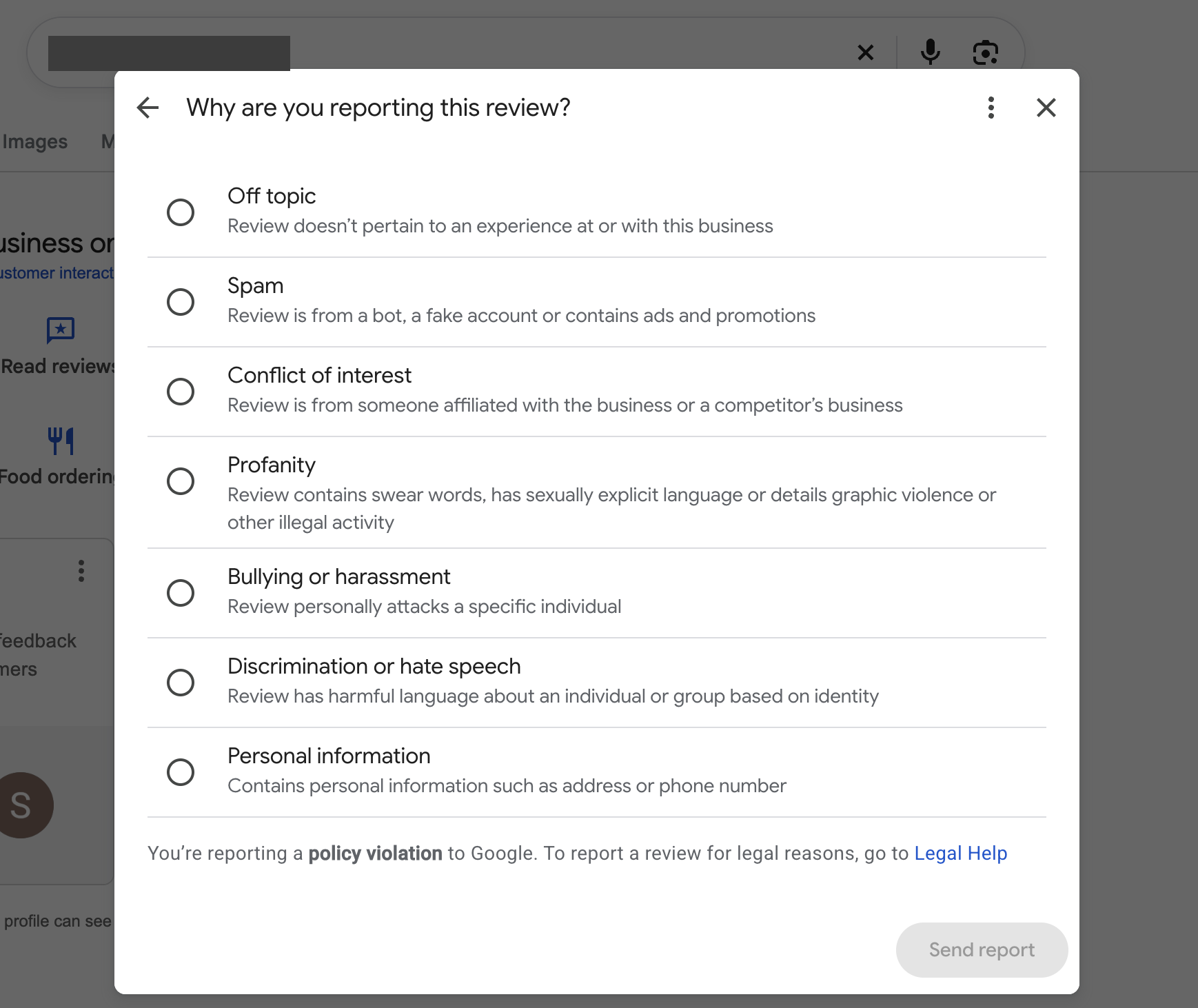
The report reasons from the business panel on Search. Personal information is on every reporting screen.
Speed matters more here than under any other policy, because every hour the detail is public is an hour it can be copied. Take a screenshot for your records, report it the same day, and tell the person whose details they are before they find it themselves. Our guide to reporting a Google review as the business owner shows each route. If the review is still up days later, how long Google takes to remove a review explains what the wait usually looks like.
If the report comes back "no policy violation", the review becomes eligible for one appeal. The policy to type is Personal information, and the explanation shows that the detail belongs to an identifiable person, is private rather than business information, and has nothing to do with a customer experience. The appeal template for this breach is in The Google Review Removal Playbook.
Before you report under this policy, point at the detail itself and ask whether a stranger could use it to reach, identify or impersonate someone away from your business; a home address, a personal number or an ID number is a report today, and a name on its own is a reply.
Private details posted? Act today
The playbook has the Personal information appeal template, the fastest reporting route, and reply guidance that keeps your own response inside the rules.
Get the Playbook · $99Several locations or a group? Talk to us about a managed service · Popular locations: Sydney · Melbourne · Brisbane · Perth · Adelaide · Gold Coast · all locations