A Google Review Published Private Details. Here Is What Google Removes.
2026-09-24
A review on your profile has published something that should never be public: your home address, your personal mobile number, or a staff member's private email. It might sit inside an angry account of a visit, or it might be the whole point of the review. Either way, anyone who looks you up can now read it.
This is one of the clearest cases there is, and it is also one of the most misunderstood. Plenty of owners believe that being named in a review is a privacy breach. It is not. The rule is about private details, and the difference decides whether your report has anything to stand on.
What the rule covers
Google's Personal information policy covers private details about an identifiable person, posted without their consent. In a review, that usually means:
- a home address, or enough of one to find the house
- a personal mobile number
- a personal email address
- a similar private detail that lets a stranger reach or locate someone outside the business
Two things make these cases strong. First, the evidence is the detail itself. You are not asking Google to judge tone or intent: the number or the address is either on the page or it is not. Second, the reviewer does not have to be fake. A real customer with a real complaint who adds "and here is where the owner lives" has broken the rule, whatever happened in the shop.
Wording that qualifies (invented examples):
- "The owner lives on the corner of the street behind the school, green fence, go and ask her yourself."
- "Here is the manager's private mobile, since he won't answer the shop phone."
In both, the reviewer has moved from describing the business to handing strangers a way to reach a person at home or in private.
Names are not private details
This is where most reports go wrong. Reviewers are allowed to name the people they dealt with. That includes you as the owner, and it includes the dentist, the agent, the stylist or the manager who served them. Google explicitly allows reviewers to name people who are part of the business or who deal with the public, so a name on its own is not a breach.
Wording that only looks similar:
- "Spoke to the owner, who was dismissive." Naming the owner, allowed.
- "The receptionist on Tuesday was rude to my mother." Describing a staff member, allowed.
- "Rang the number on their website three times and nobody answered." Your business number, published by you.
Your business address, business phone, business email and website are not private. They are on your profile because you put them there. A review that repeats them, even angrily, has not published anything.
The moment a review turns personal about a named employee, going after their competence, character or looks, it becomes a different breach. That one is covered in our post on reviews that attack a staff member by name, and our post on how to respond when a review names your staff handles the reply.
Grey areas worth a closer look
Some details sit near the line. A few we see often:
- A staff member's personal social media account. "Look her up on Instagram, she's all over it." This points to a public profile rather than publishing a private detail. It is weaker, and the review is often a better fit for the attack on a named employee.
- A surname plus a suburb. On its own, usually not enough. Combined with a description of the house or the car in the driveway, it starts to become a way to find someone.
- Details about another customer. A reviewer who publishes another customer's phone number or address has broken the same rule. The person it identifies does not have to be you or your staff.
If a review also threatens someone, treat the threat as a safety matter first and contact police. An address followed by "see you soon" is not something to leave in a report queue. Our post on swearing and threats in a Google review explains how a threat of harm is treated.
How to report it
Speed matters here more than with any other breach, because the detail is readable until the review comes down.
- Take a screenshot of the review with the date visible. If the reviewer edits it later, you keep the original.
- Open the Reviews Management Tool, signed in to the account that owns or manages your Business Profile. Our guide to the Reviews Management Tool walks through each screen.
- Choose Report a new review, click Report beside the review, and pick Personal information.
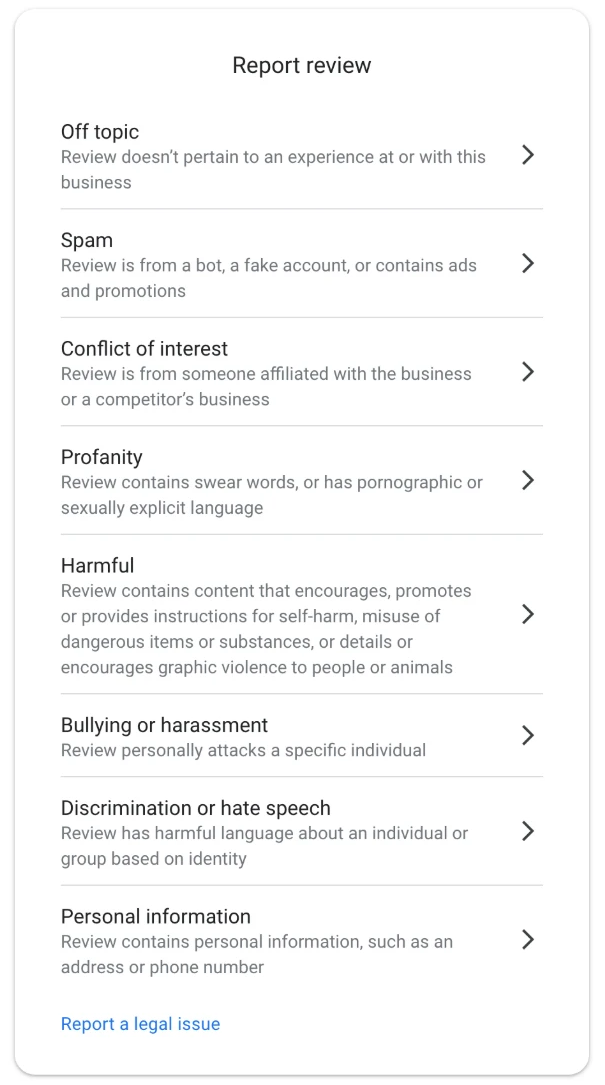
The eight reasons offered in the tool. For a published address or private number, pick Personal information.
Unlike some reasons, Personal information appears on every reporting screen: in the tool, on your business panel on Search, and on the public listing and in the Maps app, so you can report it from wherever you are. The tool is still the better choice, because it is the only place you can check the status and lodge an appeal later.
If the details belong to a staff member, they can also report the review from their own Google account. It is their information and their complaint, and it is a separate report from yours. That is different from asking friends or other staff to pile on reports, which is treated as manipulation and puts your profile at risk.
If the report is declined: the appeal
A first report can come back "Report reviewed, no policy violation", even on a clear case. That decision opens the appeal, and the appeal is where most of our cases are won. Here is what to do after a "no policy violation" decision.
The appeal form has two fields that matter. In the first, the policy, type Personal information. In the second, quote the exact detail as it appears, say whose it is and that it was published without consent, and connect the two. Leave out the story of the visit, your side of the complaint and your other reviews. The detail is the whole case.
One point on quoting: you are showing Google what the review contains, and the appeal goes to Google, not to the public. Quote exactly what the reviewer wrote. Do not add anything they did not publish, and never confirm in the appeal that a detail is correct if you do not need to. It is enough to say the review publishes a home address or a private number of an identifiable person.
The wording that ties the detail to the rule is short and fixed, and The Google Review Removal Playbook has the template for this breach ready to paste, with the detail slots marked. You get one appeal per review, so build it properly the first time. If the appeal step shows "Error accessing the workflow", that is a fault on Google's side, and this is how to get past it.
If it does not qualify, and what to keep out of your reply
If the review only names you or your staff, or repeats your business contact details, it will stay. Your public reply is now the tool that matters, because every future customer reads it.
A good reply here stays calm, answers the complaint in a sentence or two, and gives a direct business contact. Something like "I'm sorry the visit went this way, and I would like to hear more, so please email me directly" does the job without escalating anything.
Two things the reply must never do:
- Repeat or respond to private details. If a review does publish an address or a number, do not reply mentioning it. Replying draws attention to it, and quoting it puts it under your business name a second time.
- Publish the reviewer's details. It is tempting to answer "we have no booking under that address" or to quote an invoice. Do not. A reply that reveals a customer's address, phone number, order history or health details can breach privacy law as well as Google's rules, and it hands the reviewer a much stronger complaint than the one they started with.
Our negative Google review reply templates post explains what each type of reply is for, and the playbook has the full set.
If the review does publish a private detail, report it first and reply second, or not at all until the decision comes back. A calm reply beneath a review that is about to be removed achieves nothing, and a heated one can be read by everyone who saw the detail.
Before anything else, read the review for the one thing this rule protects: a way for a stranger to find or reach a person outside your business. If it is there, screenshot it and report it as Personal information in the next ten minutes.
Private details on your profile? File it today
The playbook has the ready-to-paste appeal for a published address or number, plus the reply rules that stop you making it worse.
Get the Playbook · $99Several locations or a group? Talk to us about a managed service · Popular locations: Sydney · Melbourne · Brisbane · Perth · Adelaide · Gold Coast · all locations