Google's Harassment Policy for Reviews, Explained in Plain English
2026-09-24
A review on your profile feels like harassment. It is hostile, it is personal, and it is aimed at you or someone on your team. Whether it counts as harassment under Google's rules is a narrower question, and knowing the answer before you report is the difference between a review that comes down and an appeal spent on one that never could.
The short version: the policy protects people, not businesses, and it protects some people more than others. Both halves of that decide which reviews come down.
What the Harassment policy is for
Reviews exist to tell the next customer what dealing with a business is like. The Harassment policy stops a review being used for something else: going after a person.
That purpose explains nearly every decision made under it. The policy does not protect a business from harsh criticism. A business can be called slow, rude, overpriced and badly run, and none of that is harassment. The policy is there for the moment a review stops describing a service and starts trying to frighten, belittle or hurt someone.
Two things follow from that.
- The target is a person. Harassment is about individuals. Your business as a whole is not harassed in the sense the policy means, though the people in it can be.
- The reviewer's grievance is irrelevant. A real customer with a fair complaint can still cross this line while writing. That is why reviews under this policy are among the ones that come down most readily: nobody has to prove the review is fake.
What its wording bans
In plain English, the policy covers content that harasses, bullies or intimidates an individual, and that includes threats. In reviews, that turns into four kinds of wording.
- Threats of harm. A statement that the reviewer, or someone, will hurt a person or damage property. It does not need to be spelled out. "I know which car is yours" is a threat without a single violent word in it.
- Personal attacks on an identifiable person. Going after a named individual as a person, their competence, character, looks or right to hold their job, rather than describing what they did.
- Intimidation. Wording written to make someone uneasy, such as references to when a staff member finishes, where they park or which way they walk home.
- Urging others to pile on. Telling readers to go and confront, message or target a particular person.
Two neighbouring rules are worth knowing, because owners often mistake them for this one. An attack on someone because of their race, religion, nationality, disability, gender, sexuality or age falls under Hate speech, a separate policy with its own report reason; our post on reviews containing hate speech covers it. Publishing someone's home address or personal mobile falls under Personal information, even when it is plainly meant to intimidate, and Google's personal information policy for reviews explains that one.
What people think it bans, and what stays
This is where most wasted reports come from. Each of these feels like harassment to the person reading it, and each one stays.
- Naming someone. Reviewers are allowed to name the owner and the staff who served them. A review that names the stylist and says she was rushed and dismissive is describing how the reviewer was treated. Naming is allowed; the attack on the named person is the breach.
- Unnamed staff. "The manager was rough and is in the wrong industry" is unkind, but with no name there is no identifiable individual being targeted, and it reads as a comment on the service.
- Threats to sue, complain or tell everyone. A lawyer, Fair Trading, a post in the local Facebook group: each is something the reviewer is entitled to do. It is pressure, not a threat of harm.
- Harsh criticism of the business. "Worst service in town, avoid at all costs" is a strong opinion, and opinions are what reviews are for.
- The reviewer saying they felt bullied. "The owner harassed me about the bill" is their account of your conduct, not harassment by them. Your public reply is the place to answer it.
- Rudeness about the work. "The technician was careless and didn't listen" describes a job and how it was done, named or not.
If the threat or pressure came before the review, at the counter or by email, our post on a customer threatening a bad Google review covers that situation.
Why owners get less protection than staff
The policy does not treat everyone equally, and that surprises owners. Criticism of the owner, or of whoever is the public face of the business, gets far more room than criticism of a junior employee.
The reasoning holds up. The owner chose to put their name to the business, and complaints about how it is run naturally land on them. A casual on the front desk did not choose to be discussed in public, and a review that goes after them personally is much closer to what the policy was written to stop.
In practice, that sorts reviews into three groups.
- A personal attack on a named employee, beyond describing the service, is a case worth filing and, if it comes to it, appealing.
- A personal attack on the owner ("the owner is a liar and a disgrace") is worth a free report as Bullying or harassment. The more personal it is and the less it says about the service, the better its chance, but it is not where to spend your appeal.
- A one-line dig at your honesty ("shady operators", "dodgy") is also a free report. Once the wording calls you criminals as a statement of fact, it has moved to a different policy: see Google's misrepresentation policy and the review that calls you a scammer.
The two breaches filed under Harassment
Of the 12 breaches we file for clients, two are filed under this policy. Each has its own post with examples and lookalikes, so here is only where each one sits.
Threats. A statement of harm to a person or property. If it makes you fear for anyone's safety, report it to police as well, because Google can remove the words but only police can deal with the person. The full walk-through is in swearing and threats in a Google review.
A personal attack on a named employee. The review names a staff member and goes after them as a person. It is the most common harassment case we see, and it is strongest when the review also swears at the same person. Where that line sits, with a manager's case we won on appeal, is in reviews that attack a staff member by name.
That second point settles a common tie-break. When a review swears at a named employee and attacks them, file it under Harassment rather than Obscenity & profanity. Harassment covers everything the review does to that person; the profanity policy covers only the word. Our explainer on Google's profanity policy deals with swearing that has no named target.
Which report reason to pick, on each screen
This is the simplest mapping of any policy. Bullying or harassment appears on all three reporting screens: the Reviews Management Tool, the business panel on Google Search, and the public listing or Maps app. Pick it for a threat and for an attack on a named employee.
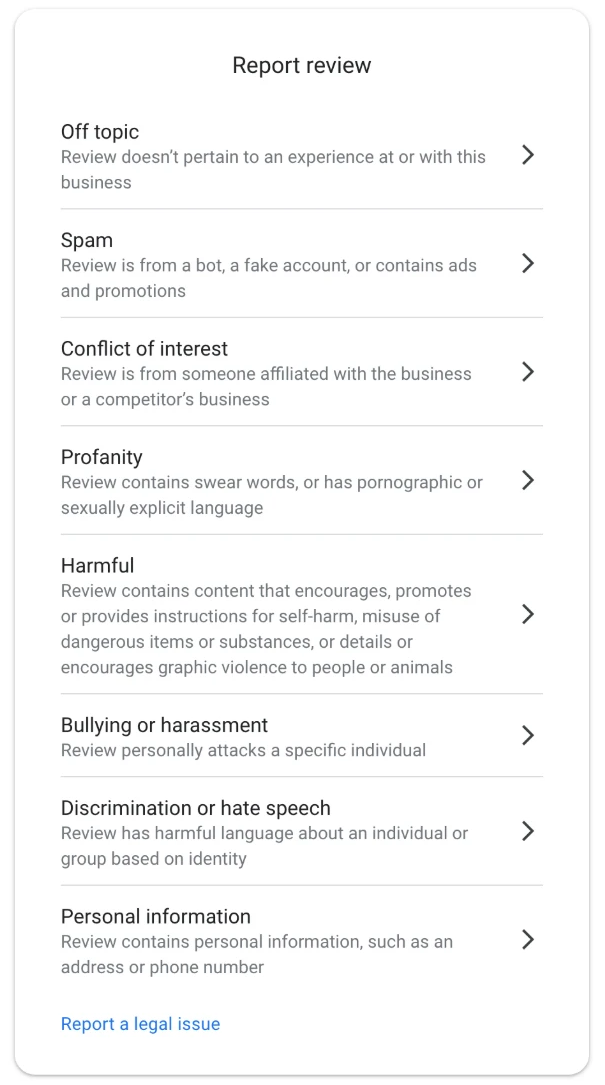
The report reasons in the Reviews Management Tool. For a threat or an attack on a named employee, pick Bullying or harassment.
Do not pick Harmful for a threat because it feels harmful. The threat is harassment, and the reason you pick should say exactly that. Harmful is only offered in the tool in any case.
Take a screenshot first, then report from the account that owns or manages your profile. The person who was threatened or attacked can also report it from their own Google account under the same reason, because it is their name on the page. Asking other staff, friends or family to report it as well is treated as manipulation, so keep it to the people named. Our guide to reporting a Google review as the business owner shows each route.
If the report comes back "no policy violation", the review becomes eligible for one appeal. The policy to type is Harassment, and the explanation quotes the exact words aimed at the person and shows that they threaten or attack rather than describe a service. The appeal templates for both of these breaches, each with a worked example, are in The Google Review Removal Playbook. If you have never lodged an appeal, start with how to appeal a Google review decision.
Before you report anything under this policy, ask one question of the exact words: are they about what happened, or about a person? A threat, or an attack on someone named, is a Bullying or harassment report today; anything that is still about the service gets a calm reply instead.
The two Harassment appeals, ready to use
Threat or attack on a named employee: the playbook has both appeal templates with worked examples, plus the reply for everything that stays.
Get the Playbook · $99Several locations or a group? Talk to us about a managed service · Popular locations: Sydney · Melbourne · Brisbane · Perth · Adelaide · Gold Coast · all locations