Google's Misrepresentation Policy and the Review That Calls You a Scammer
2026-09-24
A review calls your business a scam, or claims something sweeping about what you sell, or appears to come from someone it cannot be. The policy that covers all three is Misrepresentation, and it is the one owners find hardest to use, because there is no button with its name on it anywhere in Google's reporting screens.
Once you know which button carries it, and what the policy deliberately leaves alone, most of these reviews sort themselves in a minute.
What the Misrepresentation policy is for
Readers trust reviews because they assume two things: that the reviewer is who they appear to be, and that what is stated as fact about a business is not invented. Misrepresentation protects both. It covers content that misleads readers about a business, its goods and services, or about who is speaking.
What it does not do is turn Google into a referee. Google will not decide whether your refund policy was fair or whether the job took three days or five. A review can be one-sided, exaggerated and wrong about what happened, and still stay. The policy catches something narrower: the claim presented as settled fact that misleads everyone who reads it, and the voice that pretends to be someone else.
What its wording bans
In plain English, the policy bans false or misleading accounts of goods and services, content that distorts facts to mislead readers, and impersonation. In reviews, that comes out as three kinds of wording.
- Crime or fraud stated as fact. The reviewer labels you or your staff as criminals: scammers, fraudsters, thieves, crooks, con artists. Stated flatly, as what you are, not as how they felt.
- Sweeping claims about the business, stated as fact. Not the reviewer's own visit but a verdict on everything you do: "everything they sell is counterfeit", "their products make people sick", "they water down every drink they pour". The breadth is what matters. It tells every reader something about your business that the reviewer has no way to know.
- Impersonation. A reviewer posing as someone they are not. That covers an account set up in your business's name, a review written as if by one of your staff, and a reviewer pretending to be another real person or claiming an official role they do not hold.
The first of these is by far the most common. The line that decides it is between a label and an account, and our post on a Google review calling your business a scam takes that line apart word by word.
What stays: feelings, opinions and accounts
Most reviews that make an owner reach for this policy are ones it deliberately leaves alone. Each of these stays, however unfair it feels.
- Feelings. "I felt ripped off." "It felt like a scam to me." The reviewer is describing their experience, and that is what reviews are for.
- Opinions about value. "Overpriced." "A rip-off." "A waste of money." Customers are entitled to think you charge too much and to say so.
- Opinions marked as opinions. "In my opinion this is a dishonest way to treat people" at the end of a long story is an account plus a view, and both are allowed.
- An account you dispute. "They charged me twice and would not refund it." You may have the bank records to prove otherwise, but Google does not settle disputes about what happened. Your public reply is where your side goes, and how to respond to a Google review you dispute covers how to write it.
- A reviewer's own experience of harm. "I was sick after eating here" describes their visit. Never deny someone's illness in public; take it seriously in the reply and follow it up. The removable version is the sweeping claim about your business, not the person's account of their own night. Our post on a restaurant review claiming food poisoning goes through that line carefully.
- One-word digs. "Shady." "Dodgy." A dig at your honesty rather than an accusation of a crime. These are worth a free report as Bullying or harassment, and our explainer on Google's harassment policy covers why.
Hedged wording generally pulls a review back toward opinion. "Seems like a scam" and "probably a front for something" are weaker cases than "they are scammers", because the reviewer has marked them as a guess.
The breaches filed under Misrepresentation
One of the 12 breaches we file for clients sits here, and two related situations belong with it as free reports.
Crime or fraud stated as fact. The label on the page is the whole case, and it is one of the cleaner ones to put in front of Google because the evidence is a single word the reviewer chose. Reviewers angry enough to write out a long story very often finish with one. The full walk-through, with a case we won on appeal, is in a Google review called your business a scam. If you work in a trade, a tradie review that calls you a scammer covers the patterns specific to that industry.
Sweeping claims stated as fact. "Their food makes people sick" or "everything here is fake" is worth a free report. It is strongest when it is plainly a claim about your whole business and not the reviewer describing their own visit.
Impersonation. A review posted under your business name, or by someone claiming to be you or your staff, is worth a free report. If the account belongs to a competitor and you can show it, it is a stronger case under Fake Engagement instead, covered in Google's Fake Engagement policy explained.
If a review states something false and seriously damaging about you as fact, there may also be a legal route alongside Google's. Our post on Google review defamation in Australia covers when that is worth considering.
Which report reason to pick, on each screen
No reporting screen offers a reason called Misrepresentation, and that is why so many of these reports go in under the wrong reason. The reason that carries this policy is Spam.
- In the Reviews Management Tool: pick Spam.
- From the business panel on Google Search: pick Spam. The panel offers the same list as the tool, less Harmful.
- From the public listing or the Maps app: Spam is not offered. Low quality information is the closest match on that shorter list.
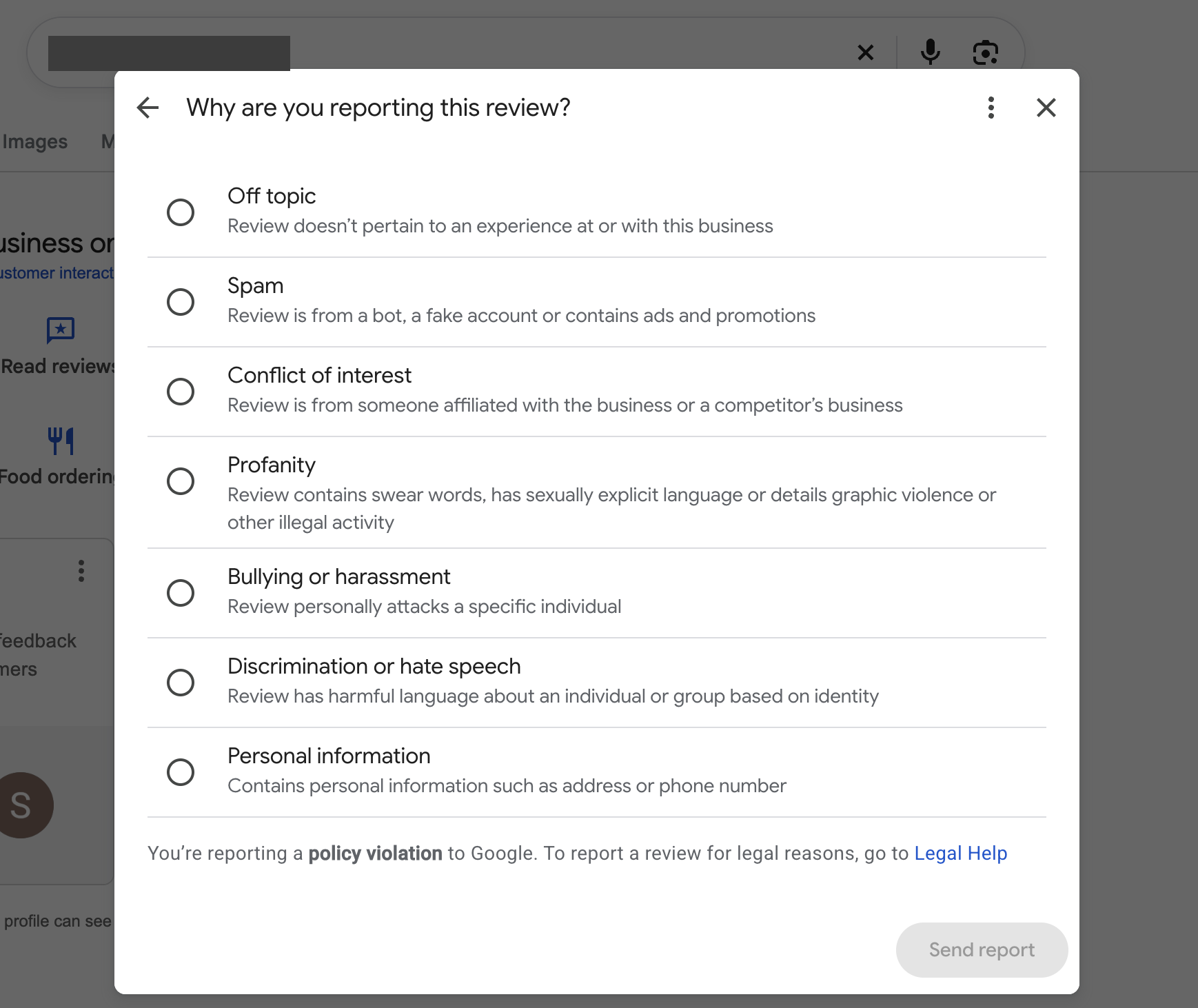
The business panel's report reasons. There is no Misrepresentation option; for a scam label, Spam carries it.
The reason is the only thing you say at the report stage, because there is no text box. Picking Harmful or Bullying or harassment because the label feels hurtful sends the review to be judged against the wrong rule. Take a screenshot first, then report from the account that manages your profile. Our guide to reporting a Google review as the business owner shows each route.
The appeal, if the report is declined
A "no policy violation" decision makes the review eligible for one appeal. This is where the policy's name finally appears: you type Misrepresentation in the policy field, then show in the explanation why the words on the page are a misleading claim of fact rather than an opinion or an account.
Strong Misrepresentation appeals quote the label or claim and nothing else. They do not argue about what happened, attach receipts or explain that the reviewer is wrong about the refund, because all of that invites Google to referee a dispute it will not referee. The appeal template for the scam label, with a worked example, is in The Google Review Removal Playbook. If the report was declined and you are not sure what to do next, a Google review came back "no policy violation" covers the options.
Before you report under this policy, find the exact words that state something as fact about what your business is. If you can point at them, report as Spam today; if all you can point at is a feeling or a story, the reply is your move.
The Misrepresentation appeal, ready to fill
The playbook's Misrepresentation appeal template is the one behind our won scam appeal, with a worked example and the reply for accounts that stay.
Get the Playbook · $99Several locations or a group? Talk to us about a managed service · Popular locations: Sydney · Melbourne · Brisbane · Perth · Adelaide · Gold Coast · all locations