'Decision Pending' on a Google Review Report: How Long It Takes and What to Do Meanwhile
2026-09-24
You reported a Google review, opened the Reviews Management Tool to check on it, and it says Decision pending. Days later it still says the same thing. The review is still on your profile, nobody has emailed you, and there is no clock telling you when that will change. This is what the status means, how long it tends to last, and how to use the wait.
What "Decision pending" means
Decision pending means your report is in Google's queue and nobody has decided it yet. That is all. It is not a sign the report is weak, and it is not a sign it is about to succeed.
While a report is pending:
- The review stays up. Nothing changes on your profile.
- The reviewer is not told that anyone reported it.
- Nothing you do in the tool speeds it up. There is no button to chase it, and no case number at this stage.
You find the status by opening the Reviews Management Tool, signed in to the account that manages your Business Profile, picking the business, and choosing Check the status of a review I reported and appeal options.
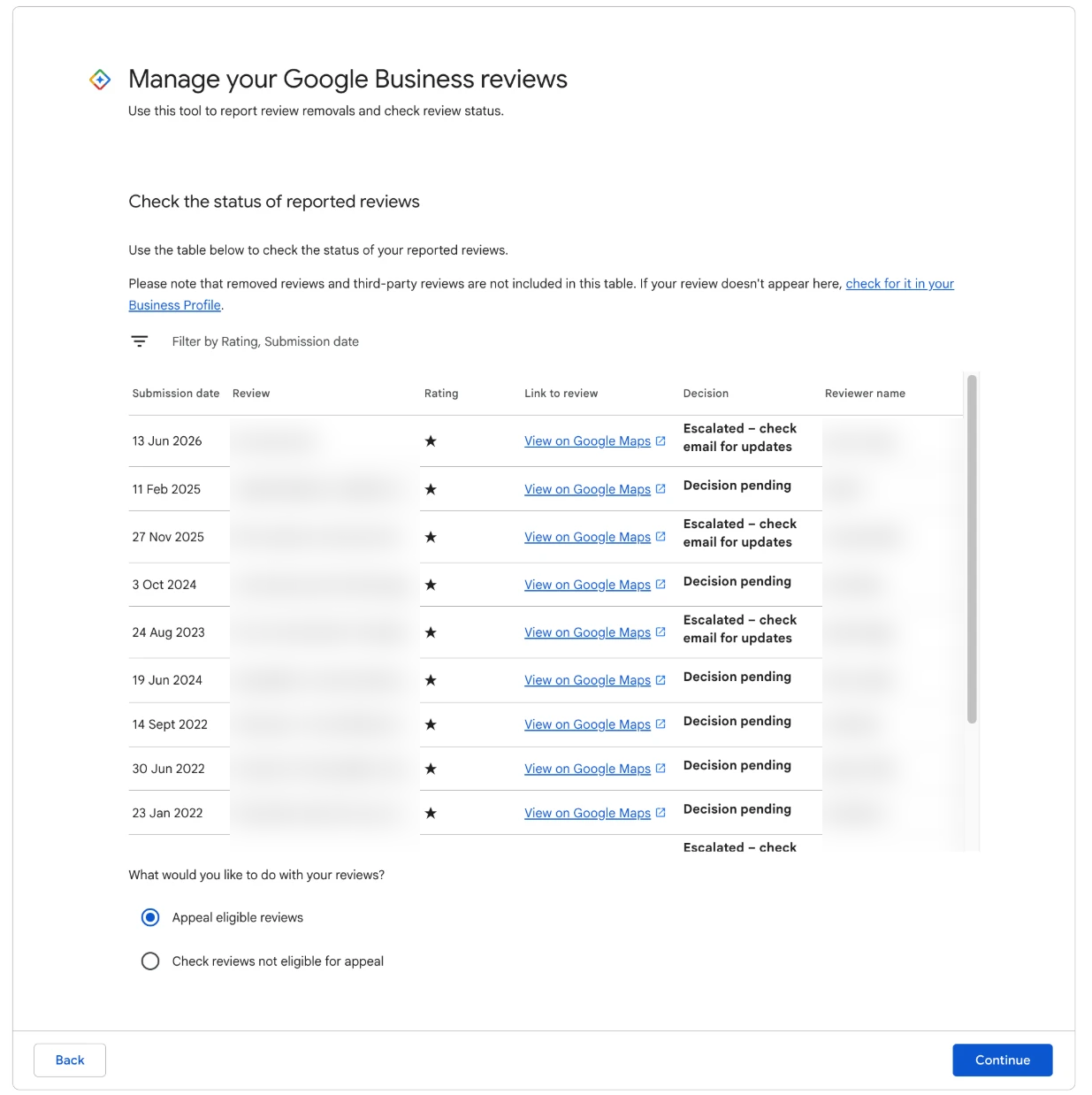
Every report you have made from this account is listed with one of three statuses.
The three statuses, side by side
A report moves from the first status to one of the other two, or the review simply disappears.
- Decision pending. Waiting in the queue.
- Report reviewed, no policy violation. The first look found nothing to remove. The review stays, and the list shows whether it is eligible for appeal.
- Escalated. It has been passed on for a closer look.
There is no "removed" status. If your report succeeds, the review disappears from your profile and a decision email goes to the account that made the report. So if a pending report seems to have vanished from the list, check your profile and your inbox before assuming something went wrong. How to tell whether Google removed a review covers where to look.
How long it takes, in our experience
There is no fixed timeframe. We file reports for clients every week, and we have seen decisions arrive the next day and we have seen reports sit on Decision pending for several weeks. Most land somewhere in between, within a week or two.
We do not know how Google orders its queue, and we will not pretend to. What we can say from the owner's side:
- A long wait is not a bad sign. Some of our longest-pending reports ended in removal. Some of our fastest came back declined.
- Timing varies between businesses and between weeks. Two reports lodged on the same day for the same profile can come back a fortnight apart.
- Appeals run on a similar clock. Days, sometimes weeks, with a case ID emailed to you when the appeal is received.
For every stage from first report to appeal decision, see how long Google takes to remove a review.
Decisions come by email to the account that made the report. Check the spam folder. It is easy to spend weeks refreshing the tool while the answer sits in junk mail. The Google Maps app also keeps a record of reports you have made, under Reports in your profile, which is a useful second place to look.
What "Escalated" means
Escalated means your report has been passed on for a closer look, which in practice means a person rather than an automated first pass. It is the status owners find hardest to read, because it is neither a yes nor a no.
What we know about it:
- It takes longer. Weeks is normal.
- It is not a verdict. We have seen escalated reports end in removal and in "no policy violation".
- You do not need to do anything. There is no extra form to fill in and no information to add.
What we do not know is why one report is escalated and another is not. Google does not say, and we would rather tell you that than guess. Treat Escalated as Decision pending with a longer wait, and keep checking your email.
Do not report the same review again while it is pending
This is the most common mistake we see. The report has been pending for a week, the review is still up, and the owner reports it again, or reports it from a different screen, or asks a colleague to report it too.
A second report on a review that already has one open does nothing useful. It does not move your report up the queue, and it does not add weight. Reports from friends, family or staff who were not personally attacked in the review are worse than useless: coordinated reporting is treated as manipulation, and it puts your profile at risk. Can you report a Google review twice? covers the few situations where a second report does make sense.
The same applies to the appeal. A review still marked Decision pending cannot be appealed, because the appeal only opens once a report comes back "no policy violation". If you are appealing other reviews and the appeal step shows "Error accessing the workflow. Please escalate the issue.", leave any pending reviews out of your selection and try again. That error is a Google-side fault, not a problem with your account.
What to do while you wait
The wait is not dead time. These four jobs are the ones that pay off.
1. Reply to the review
Post your public reply now, not after the decision. If the review comes down, the reply goes with it and you have lost nothing. If it stays, you have already given the next customer your side.
Keep it short and calm, acknowledge one specific thing, and give a direct way to reach you. Leave the report out of it: a reply that mentions reporting or policies reads as a threat. Our reply templates for negative Google reviews cover the common complaints.
2. Report your other strong reviews
If other reviews on your profile contain a clear breach (a threat, swearing aimed at a person, a claim of fraud stated as fact, an attack on a named employee), report them now. There is no reason to wait for one decision before lodging the next. We work in batches, strongest first, about five at a time, so each report is a well-aimed one.
3. Prepare the appeal
If the pending report comes back "no policy violation", the appeal is your next move, and it is where most of our removals are won. Get it ready now, while the review is fresh in your mind:
- Copy the exact phrase that breaks the rule, word for word.
- Decide on the one policy it breaks, by Google's name: Harassment, Misrepresentation, Obscenity & profanity and so on.
- Note anything you would want to say about the visit itself, and move it to your reply. It does not belong in the appeal.
The appeal form has a field for the policy and a field for why the review breaks it, and the second field works best in a short, set structure that ties the quote to the rule. The Google Review Removal Playbook has that structure written out for each of the 12 breaches Google acts on, so the appeal is ready to paste the day the decision lands. What to write in a Google review appeal explains why it works.
4. Log it
Write the date you reported, the reason you picked and the exact phrase into your tracker, with a screenshot of the review. If the reviewer edits it while you wait, you will have the original. If it is removed and later returns, you will be able to prove it.
When pending starts to feel stuck
If a report has been on Decision pending for more than a few weeks, run through this before doing anything else:
- Search every folder of the reporting account's inbox, spam included, for anything from Google.
- Check that you are signed in to the account that made the report. The status list only shows reports made from that account.
- Check your profile. If the review has gone, the report may have succeeded, or the review may have been removed or deleted for another reason.
- Check the review has not been edited. If the reviewer took the offending words out, there may be nothing left to decide.
If all four come up empty and weeks have become months, you can ask Business Profile support to look at it. We cannot tell you it will speed anything up. What does help is having your screenshot, the date you reported and the reason you picked to hand, so the question takes one message instead of five.
The report is out of your hands until Google decides. The reply, the next report and the appeal draft are not, and an owner who has done all three by the time the email arrives is a week ahead of one who spent that week refreshing the status page.
Have the appeal ready before the email
Appeal wording for all 12 breaches Google acts on, so a declined report becomes an appeal lodged the same afternoon.
Get the Playbook · $99Several locations or a group? Talk to us about a managed service · Popular locations: Sydney · Melbourne · Brisbane · Perth · Adelaide · Gold Coast · all locations