How to Tell Whether Google Removed a Review (and Why It Sometimes Just Vanishes)
2026-09-24
You reported a review, and now you are not sure whether anything happened. The review might be gone, or you might just not be finding it. Or it vanished from your profile without you reporting it at all, and you want to know why. Google gives owners three places to look, and none of them uses the word "removed" as a status.
What a removal looks like on your profile
When Google removes a review, it simply disappears. There is no notice where it used to be, no "removed by Google" label, and no strike-through. The reviewer's words, their star rating and your reply all go at once.
A few things change with it:
- The review is no longer in your review list, on Google Search or in Google Maps.
- Your reply goes with it. You will not find it anywhere in your Business Profile.
- The star rating is recalculated without it. On a small profile, one removed one-star can move your average visibly. On a large one, you may not notice.
Before you conclude that it has gone, look properly. Sort your reviews by Lowest rating or Newest, and scroll further than feels necessary. On a profile with hundreds of reviews it is easy to miss one. It is also worth checking in a private browser window while signed out, because what a signed-in account sees is not always exactly what the public sees.
If the review is gone from every view, something removed it. The next two places tell you whether it was your report.
The status list in the Reviews Management Tool
The Reviews Management Tool is the owner's tool for reporting reviews, and it is the only place to check the status of a report. Open it signed in to the account that manages your Business Profile, pick the business, and choose Check the status of a review I reported and appeal options.
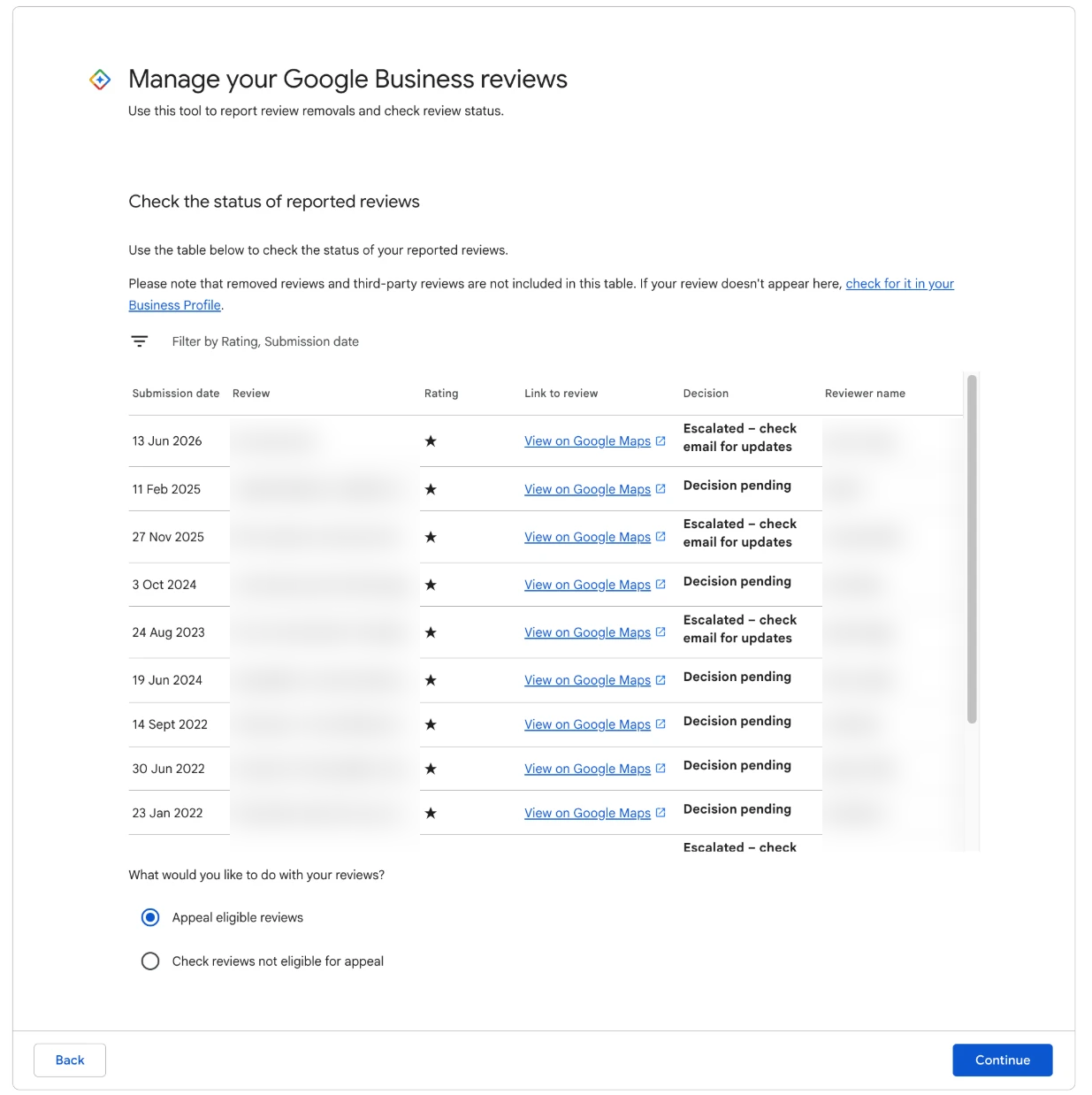
The three statuses a report can show. There is no status for "removed".
Each report shows one of three statuses:
- Decision pending. Nobody has decided yet. The review should still be on your profile.
- Report reviewed, no policy violation. The first look found nothing to remove. The review stays, and the list shows whether it is eligible for appeal.
- Escalated. A person is looking at it more closely. This takes longer.
Because there is no "removed" status, the tool tells you what has not happened more clearly than what has. If a review you reported is gone from your profile and the tool does not show it as pending, declined or escalated, the likeliest reading is that your report succeeded. The email confirms it. If a report has been sitting on Decision pending for a while, what "Decision pending" means and how long it takes covers the wait.
The decision emails
Decisions go by email to the account that made the report. If you reported from a manager's account, the email goes to that manager's inbox, not the owner's. Check the spam and promotions folders first, because that is where these emails most often land.
A removal can arrive in more than one form. The two we see most often are these.
"A review has been removed from your Business Profile." This is the plainest one. It tells you a review has been taken down.
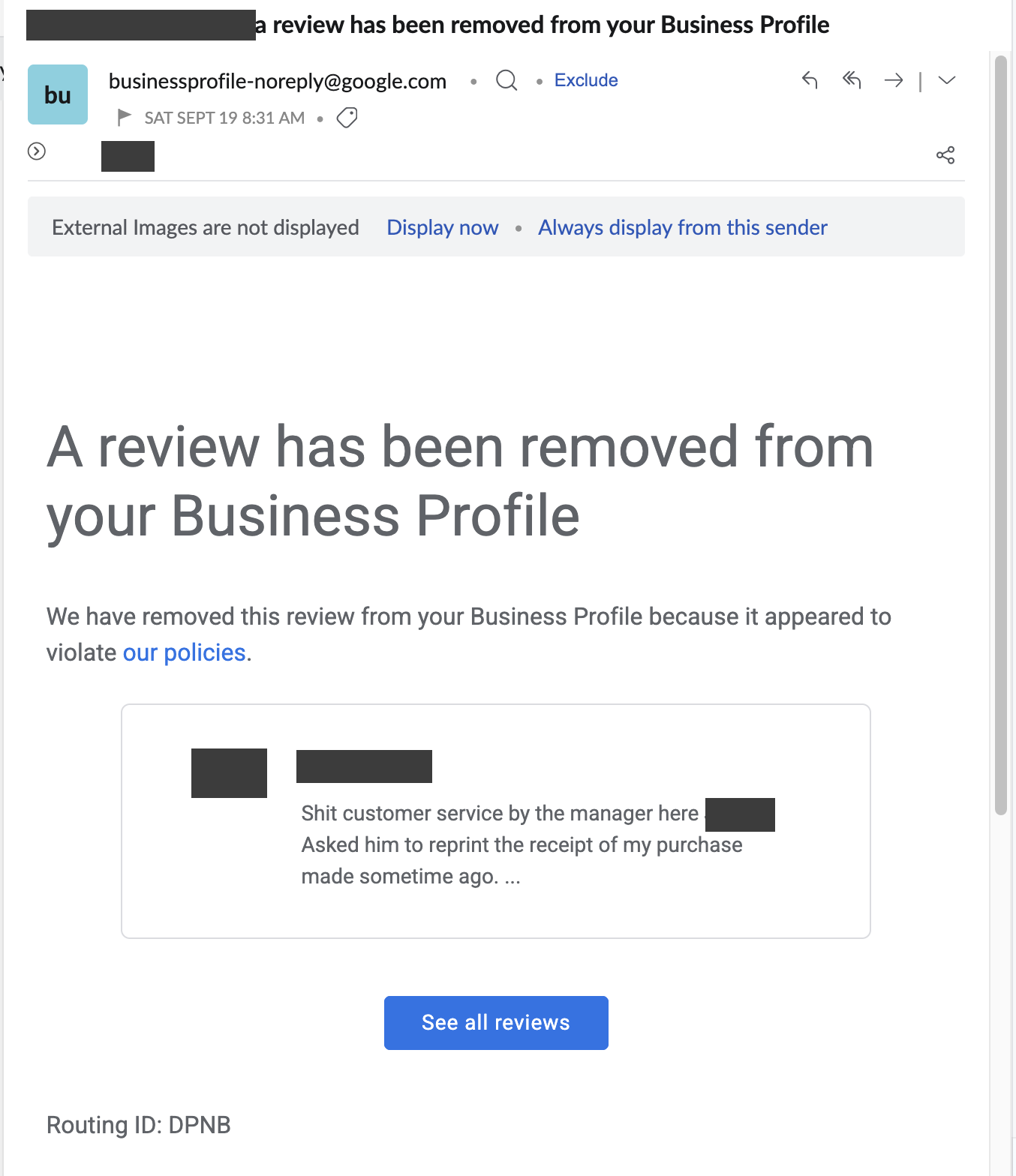
This one followed our appeal on a review that swore at a named manager, Dylan. The review came down after the first report had been declined.
"Your Request to Google." This one is less obvious from the subject line. Inside, it says Google found the reviews in violation of its policies and has made the removals you asked for. We received it after an appeal on a review that called a business "scammers", and it is easy to skim past or file as a receipt. Open anything from Google with "request" in the subject.
Both emails came to us after appeals rather than first reports, and Google varies the wording. Read for the words removed or removals. If the email says your report was reviewed and no policy violation was found, the review stays, and your next step is the appeal. Google said "no policy violation" explains what to do with that one.
The email and your profile do not always update at the same moment. If the email says removed and you can still see the review, give it a day before you worry.
Reviews that vanish without a report
Sometimes a review disappears and nobody reported it, or you reported it but no email ever came. We cannot see Google's internal reasons for any single review, but the usual explanations are these.
Google's automated filters took it down. Google checks reviews continually, not only when someone reports them. A review can be removed by a filter weeks after it was posted, and good reviews are caught this way as well as bad ones.
The reviewer deleted it. Reviewers can delete their own reviews at any time. Some do after a complaint is resolved, some after reading a calm reply, some for reasons of their own. You are not told.
The reviewer's account went away. When a Google account is deleted or suspended, every review it left disappears with it. Again, there is no notice.
The reviewer edited it beyond recognition. Not a removal at all. A one-star can become a four-star with new text, and if you were searching for the old wording, it can look as if it vanished. Check the reviewer's name.
If you had reported the review and it vanished for one of these reasons before Google decided, the report may never produce a decision email. We do not know how Google handles that case internally, so if the review is gone, treat it as done and mark it in your tracker.
Reviews also come back. Automated systems reinstate some of the reviews they remove, and reviewers sometimes post a removed review again. If one you thought had gone reappears, a removed review that came back walks through what to check. For the full list of reasons reviews go missing, see why Google reviews disappear.
The tracker habit that answers this in seconds
Every question in this post is easier to answer if you wrote three things down on the day you reported:
| Keep | Why it matters later |
|---|---|
| The date you reported | Tells you how long it has been, and which email to look for. |
| A screenshot of the review | Proves what it said, and lets you spot an edit or a repost. |
| The status | Pending, declined, escalated, appealed or removed, updated each time you check. |
Add the exact phrase you reported and the reason you picked, and you have a record that tells you, at a glance, which reviews are still in play and which are finished. When a review disappears, you look at the row: if it was reported and the email says removed, it is a win. If it was never reported, something else took it, and you note the date anyway.
Keeping the decision email matters too. Do not delete it once the review is gone. If the same review returns, or the reviewer reposts the same words, that email is the record that Google has already ruled on them. The Google Review Removal Playbook includes a tracker set out with a column for each of these, so every report has a home the day you make it.
A two-minute check, once a week
When you have reports in play, set yourself one short check each week:
- Search your inbox, including spam, for emails from Google about reviews.
- Open the status list in the Reviews Management Tool and note any change.
- Look at your profile, sorted by lowest rating, for anything missing or new.
- Update the tracker.
If a report comes back declined, how to appeal a Google review decision is the next step, and the review's own words are still your case. If the review has gone, cross it off, and look at what it said: the next review that crosses the same line is one you can report the day it lands.
Know where every report stands
A ready-made tracker, the email decoder and the next move for every decision, so you always know which reviews are finished and which are still live.
Get the Playbook · $99Several locations or a group? Talk to us about a managed service · Popular locations: Sydney · Melbourne · Brisbane · Perth · Adelaide · Gold Coast · all locations