Google's Off-Topic Review Policy: Rants, Wrong Businesses and Reviews With No Visit In Them
2026-09-24
A review on your profile is not really about you. It might be about politics, about the state of the industry, about a different shop with a similar name, or about something the reviewer read online. The policy for that is Off-topic, and it is one of the more straightforward rules Google applies, as long as you read it the way it is written.
The whole policy turns on one question about the review, and once you know it, most off-topic calls take seconds.
What the Off-topic policy is for
Every review is attached to one place. The Off-topic policy keeps each review about an experience at that place, so that a reader scrolling your profile learns what it is like to deal with your business, not what the reviewer thinks about the world or about somebody else's shop.
That gives the policy a single question, and it is worth asking before anything else: is there an experience with this business anywhere in the review? A visit, a purchase, a phone call, a quote, a delivery. If there is, the review is on-topic, however much else it wanders into. If there is not, the review has no business being on your profile.
What its wording bans
In plain English, the policy bans content that is not about an experience at the specific location it is posted on. In reviews, that covers:
- Political and social commentary. Views on the government, the economy, immigration, vaccines or any public debate, with no visit described.
- General rants. "Businesses like this are everything wrong with this country." A complaint about a type of business or an industry, not about dealing with yours.
- Reviews of a different business. A complaint about a pizza delivery posted on a plumber's profile, a review naming a competitor's address, a review meant for a similarly named business in another suburb.
- Commentary on news or social media. Reviews about something the reviewer saw in a news story or a viral post, rather than something that happened to them at your business.
- Personal grievances with no business experience in them. A dispute with someone who happens to work there, written up as a review, with no purchase or service anywhere in it.
The first three are by far the most common. The fourth usually arrives in a cluster after a business has been in the news, and our post on Google review bombing covers that pattern.
What stays: reviews that only look off-topic
Owners often read a review as off-topic because it goes somewhere unexpected. The test is not whether the review wanders. It is whether a visit is in it.
- A real complaint with an aside. "Waited forty minutes for a cold coffee, and don't get me started on this government." The aside is off-topic; the review is not. There is a visit in it, so it stays.
- A review of your other branch. A review of your city store posted on your suburban one is still about your business. It is a mix-up, not an off-topic review. A free report as Off topic does no harm, but do not spend an appeal on it, and reply pointing the reader to the right location.
- Things at the edge of your control. Parking, the shopping centre, the courier who delivered your product, the booking system you use. Each is part of dealing with you.
- Quotes, enquiries and phone calls. "Rang for a price and got attitude" is a review of that phone call.
- Old visits. Age is not a rule. A review of a visit three years ago is still on-topic.
- A visit plus opinions about your values. A reviewer who came in and disliked your signage, your music or your prices is describing their visit, even if they write about it in political terms.
If you are not sure which side a review sits on, read it with the politics and the commentary crossed out. Whatever is left is what you are judging.
The two breaches filed under Off-topic
Of the 12 breaches we file for clients, two are filed under this policy. Each has its own post with examples and lookalikes, so here is only where each one sits.
It is about a different business. The review clearly describes a company, location or product that is not yours. The case rests on showing the mismatch, and a Google review about the wrong business covers how to spot it and how to show it.
A rant with no visit in it. Political, social or personal commentary with no experience of your business anywhere in the text. Removing an off-topic Google review rant covers the wording that qualifies and the asides that do not.
Sometimes a rant also says, in the reviewer's own words, that they have never been in: "never used them, leaving this because of their politics". That admission is usually the stronger case, and it files under a different policy, Fake Engagement. Pick one policy per review and stay on it. Google's Fake Engagement policy explained covers the admission case.
Which report reason to pick, on each screen
Off topic is one of the reasons that changes depending on where you report from, so the screen matters.
- In the Reviews Management Tool: pick Off topic.
- From the business panel on Google Search: pick Off topic. The panel offers the same list as the tool, less Harmful.
- From the public listing or the Maps app: Off topic is not offered. The closest match is Low quality information, which stands in for Off topic, Spam and Conflict of interest on that shorter list.
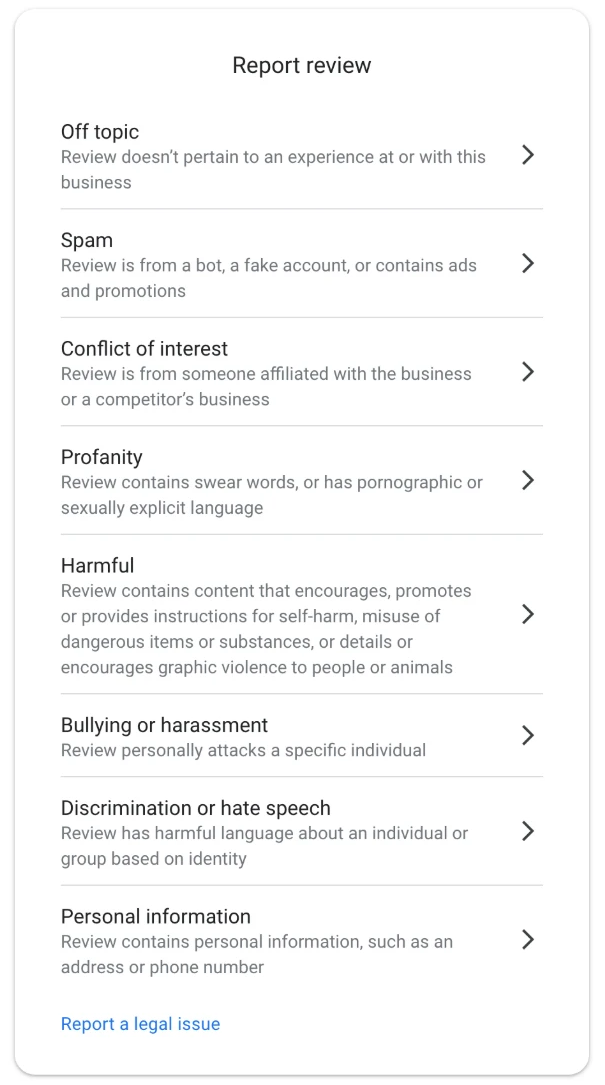
The report reasons in the Reviews Management Tool. For a rant or a review of another business, pick Off topic.
Low quality information still gets the review into the system, but it tells Google less about what is wrong, so use the owner routes wherever you can. Our guide to the Reviews Management Tool shows each screen, and reporting a Google review as the business owner covers when to use each route.
Take a screenshot before you report. Rants in particular get edited, and a reviewer who adds a line about a visit after you report can turn an off-topic review into an on-topic one.
The appeal, if the report is declined
A "no policy violation" decision makes the review eligible for one appeal. The policy to type is Off-topic. The explanation quotes the words that show there is no visit, or that show the review is about somewhere else, and keeps to that. It does not argue that the reviewer's politics are wrong or that the review is unfair. The appeal templates for both of these breaches are in The Google Review Removal Playbook.
If the appeal form will not load, with an "Error accessing the workflow" message, that is a fault on Google's side rather than a flag on your account, and the appeal workflow error explains the workaround.
While a report is pending, reply briefly and without taking the bait. For a review of the wrong business, one line saying you have no record of the product or address it describes, and where the reader might find the business they meant, is enough; a reader who sees that understands the review immediately.
Before you report, cross out every sentence about politics, the industry or another business, then look at what is left: if there is no visit, report it as Off topic today; if there is one, answer the visit and ignore the rest.
Rants and wrong-business reviews, handled
Both Off-topic appeal templates, the screen-by-screen reporting steps, and a tracker to follow every report through to Google's decision.
Get the Playbook · $99Several locations or a group? Talk to us about a managed service · Popular locations: Sydney · Melbourne · Brisbane · Perth · Adelaide · Gold Coast · all locations